Home / Club management software / ORBIT

ORBIT player retention technology: an adult athlete with orbit rings and icons for supported sports

Keep players in your club's orbit

ORBIT is player retention technology for sports clubs. It spots players drifting away while there is still time to act, gives unhappy families a private way to ask for a conversation, and shows when your volunteers are stretched too thin.

Talk to our team

Book a demo, ask a question or get your club started.

What would you like?

We'll only use this to reply to your request. Prefer to sign up now? Create your club account.

What is Club Drift?

Club Drift is the slow loss of connection between a player and their club. It rarely starts with a decision to quit. It starts with a missed practice, an RSVP left unanswered, a family that stops reading club messages, or an older sibling who moves on. By the time anyone notices, registration has closed and the roster spot is empty.

ORBIT's goal is to help clubs increase season-to-season retention by 14% to 23%.

Missed sessionsAttendance slips quietly, one practice at a time.
SilenceInvitations go unanswered and app messages go unread.
Unspoken frustrationPlaying time, coaching or scheduling worries never reach the club.
Family changesA sibling leaves and the younger player often follows.
Why do clubs find out too late?

Each of those signs leaves a trace the club already holds, in attendance, RSVPs, app activity and feedback. But the traces sit in different places: a coach's notes, a group chat, a registration export. Nobody sees them together until the player simply doesn't register.

Most club software records that moment. ORBIT is built for the weeks before it, when a call from a coach can still change the outcome.

Is ORBIT only for youth clubs?

No. ORBIT works the same way for adult programs. For players under 18, every family-facing step goes to the guardian, never the child.

Three tools, one goal

Club Drift, WinBack and the Volunteer Burnout Radar live inside your club's Play 2 Earn Sports account, next to registration, scheduling and team chat. The screenshots use a demo club with sample data.

Club Drift

See who is drifting, and why

Club Drift lists the players whose connection with the club is weakening, with the reasons for each one and a suggested next step.

  • Attendance falling compared with earlier in the season
  • Game and practice invitations left unanswered
  • A family that has stopped opening the app
  • A sibling who has left the club
  • A family that asked for a conversation through WinBack
What Club Drift uses, and what it doesn't

It works only from data the club already has. It is worked out when staff open the page, it is never shown to players or parents, and nothing is sent automatically. Every signal is listed with its weight, so a coach can see exactly why a player is on the list and decide whether it matters.

Anonymous session feedback is never used to score an individual player.
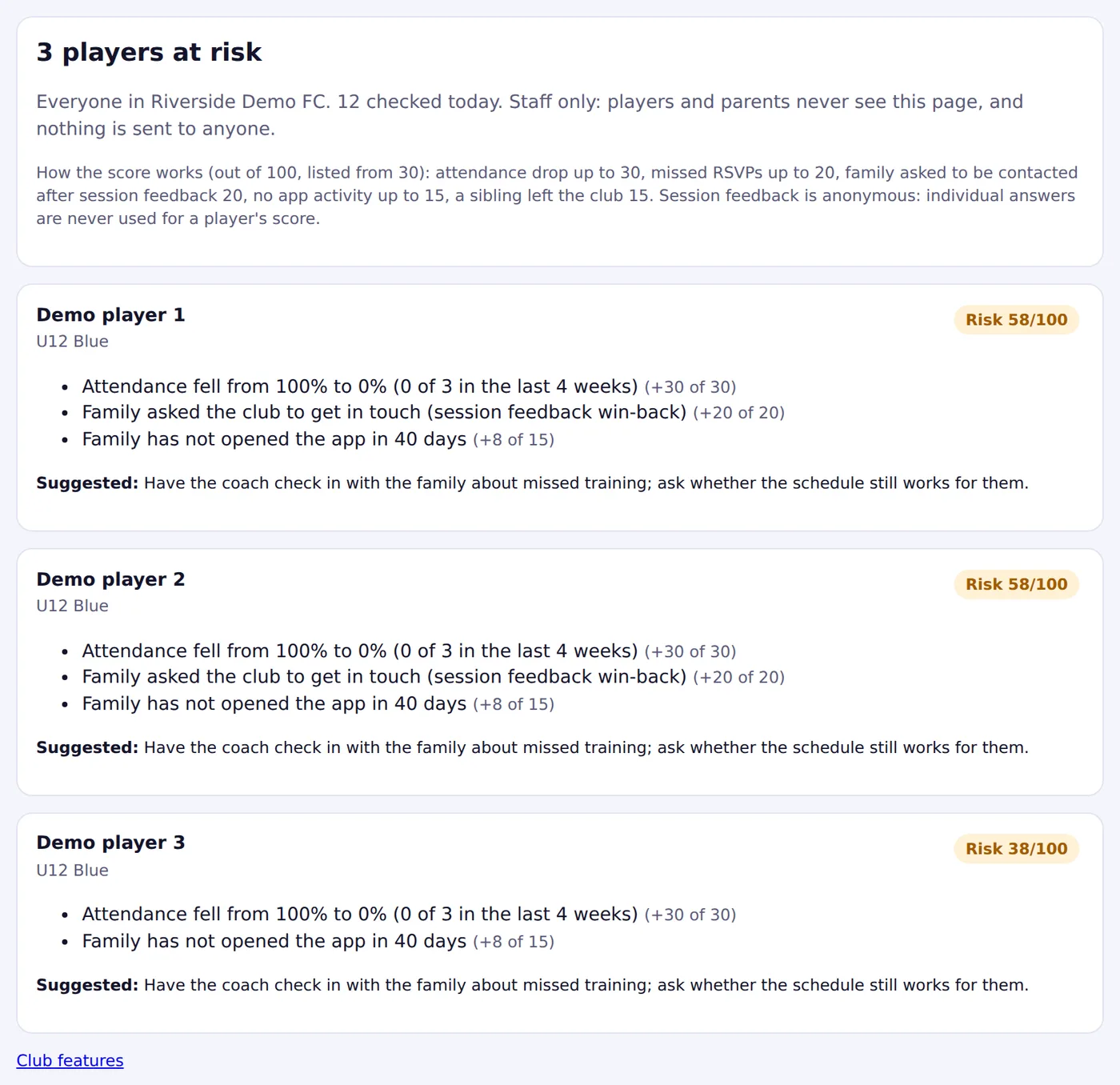
Sample Club Drift list: demo players with the attendance, RSVP and app-activity signals behind each one and a suggested next step
Club Drift on a demo club (sample data).
WinBack

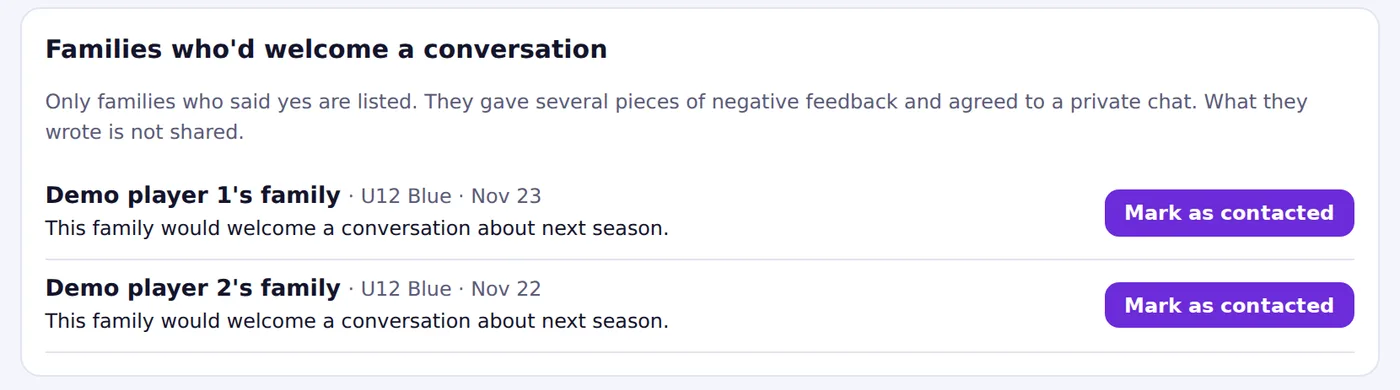
Consent-based conversations with unhappy families

After practices and games, players or guardians can rate the session in a few taps. Answers are anonymous to the club.

  • Repeated negative answers over a few months trigger one private question to the family
  • For players under 18, the question goes to the guardian, never the child
  • Only a yes puts the family on the club's "Families who'd welcome a conversation" card
  • What they wrote is never shared, and a no shares nothing
Reaching families who have already left

WinBack also lets a club send a welcome-back offer to families of players from a recent season who haven't registered for the current one. It goes out through the club's own email with an unsubscribe link, and skips anyone who has opted out of club email.

Sample Families who'd welcome a conversation card listing two demo families with a Mark as contacted button
WinBack conversation requests on a demo club (sample data).
Volunteer Burnout Radar

Share the load before volunteers quit

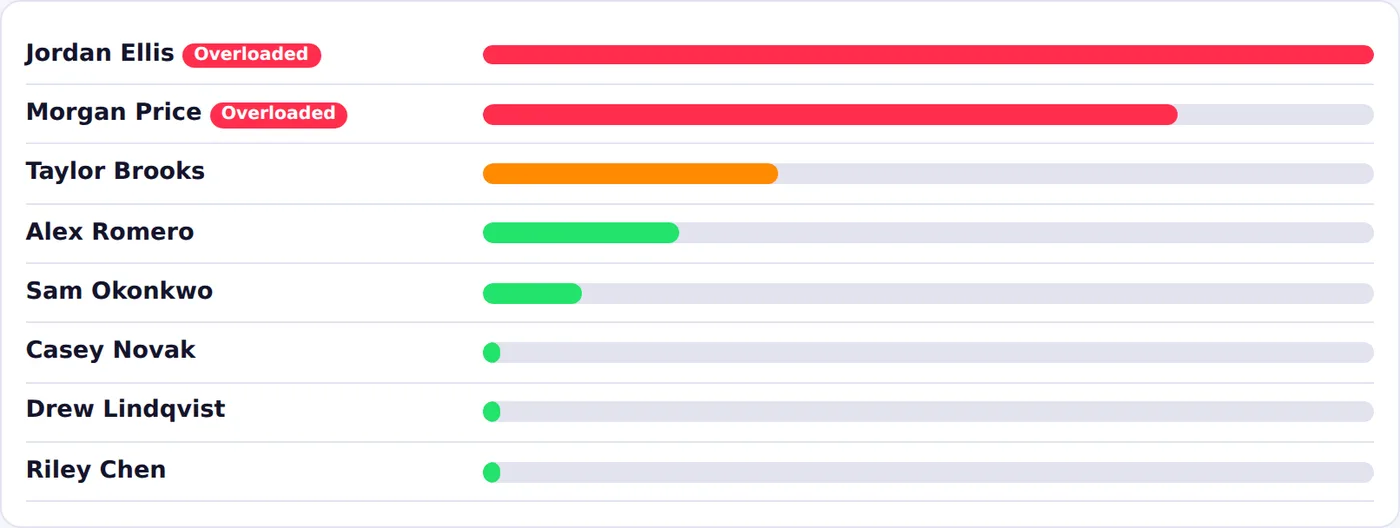
Clubs run on a few parents who always say yes, until they stop. The radar makes the load visible.

  • How volunteer jobs are spread across the club over the past year
  • Who carries the most on each team, compared with the team average
  • Parents who haven't been asked yet, ready to invite
  • Read-only: nothing is sent from the radar, and coaches see only their teams
Sample Volunteer Burnout Radar team view: bars showing how volunteer jobs are spread across demo parents, with two marked overloaded
Volunteer Burnout Radar on a demo club (sample data, fictional names).

How ORBIT works

No new app for families and no extra data entry for coaches. ORBIT reads what your club already does on Play 2 Earn Sports.

  1. Run your seasonRegistration, schedules, attendance and team chat run on Play 2 Earn Sports as usual.
  2. Families give feedbackA quick, anonymous rating after sessions, from the player or the guardian.
  3. ORBIT spots driftClub Drift lists players at risk with the reasons, and the radar shows volunteer strain.
  4. Your club reaches outA coach calls, a director meets a family who asked for a conversation, or a new parent is asked to help.

Privacy built in

Feedback is anonymousThe club sees session averages and themes once enough answers are in, never who wrote what. Safety concerns go to our safety team.
Names only with consentA family's name reaches the club only when the family says yes to a conversation.
Under-18 profiles hiddenProfiles of players under 18 are hidden by default; families choose whether to show them.

More reasons to stay

Player profiles across seasons

Stats, evaluations, achievements and awards stay with the player from season to season, so the club becomes part of their story. See how clubs run on Play 2 Earn Sports.

Uplink

Sports videos, challenges, polls and community posts give players a reason to stay involved between games and practices. Explore the Uplink challenges.

ORBIT questions and answers

What is ORBIT?

ORBIT is the player retention technology inside Play 2 Earn Sports. It brings together Club Drift, which flags players whose connection with the club is weakening, WinBack, which lets families who are unhappy ask for a conversation with the club, and the Volunteer Burnout Radar, which shows when too much club work sits with too few parents.

What is Club Drift?

Club Drift is the gradual loss of connection between a player and their club: missed sessions, unanswered invitations, a family that stops opening club messages. ORBIT lists the players showing those signs, explains which signals put each one on the list and suggests a next step for the coach or club director.

How does ORBIT decide a player might be drifting?

It uses information the club already has: recent attendance compared with earlier in the season, RSVPs to games and practices, whether the family has been active in the app, whether a sibling has left the club, and whether the family has asked for a conversation through WinBack. Every listed player shows the reasons, so staff can judge for themselves.

Is player feedback anonymous?

Yes. Session feedback is anonymous to the club. Coaches and directors see averages and themes for a session only once enough answers are in, so a single answer cannot be traced back to a family. Safety concerns go to the Play 2 Earn Sports safety team, not to the club.

When does the club see a family's name?

Only when the family agrees. After a run of negative feedback, ORBIT asks the adult player, or the guardian when the player is under 18, whether they would welcome a conversation with the club. If they say yes, the club sees the family on its "Families who'd welcome a conversation" card. If they say no, nothing is shared.

Does ORBIT contact former players?

Clubs can send a win-back offer to families of players who played in a recent season but have not registered for the current one. It goes out through the club's own email path with an unsubscribe link, and families who opted out of club email are never contacted.

What does the Volunteer Burnout Radar show?

It shows how volunteer jobs are spread across parents over the past year, which parents carry the most, which teams lean on the same people, and who has not been asked yet. It is read-only: nothing is sent from the radar, so the club decides who to ask.

Who can see ORBIT's insights?

Club staff only. Coaches see their own teams. Players and parents never see risk lists, and there is no public view of them.

Are children's profiles public?

No. Profiles of players under 18 are hidden by default. A parent or the player can choose to make a profile visible.

What results can a club expect?

ORBIT's goal is to help clubs increase season-to-season retention by 14% to 23%. It does that by giving clubs earlier warning and a consent-based way to reach families, but the conversations and the season experience are still the club's.

How do we get ORBIT?

ORBIT is part of Play 2 Earn Sports for clubs. Request a demo and we will walk your club through Club Drift, WinBack and the Volunteer Burnout Radar on sample data.

See ORBIT on your club

We'll walk you through Club Drift, WinBack and the Volunteer Burnout Radar on sample data, and show how they fit with registration and scheduling. Or get your club started today.

What would you like?

We'll only use this to reply to your request. Prefer to sign up now? Create your club account.