


On this page
What a basketball play drawing app does
A basketball play drawing app is a digital clipboard. You place the five players, draw the cuts, screens and passes, and save the diagram. The useful ones also get the play in front of players, because a play drawn on a coach's tablet doesn't help the point guard learn it at home.
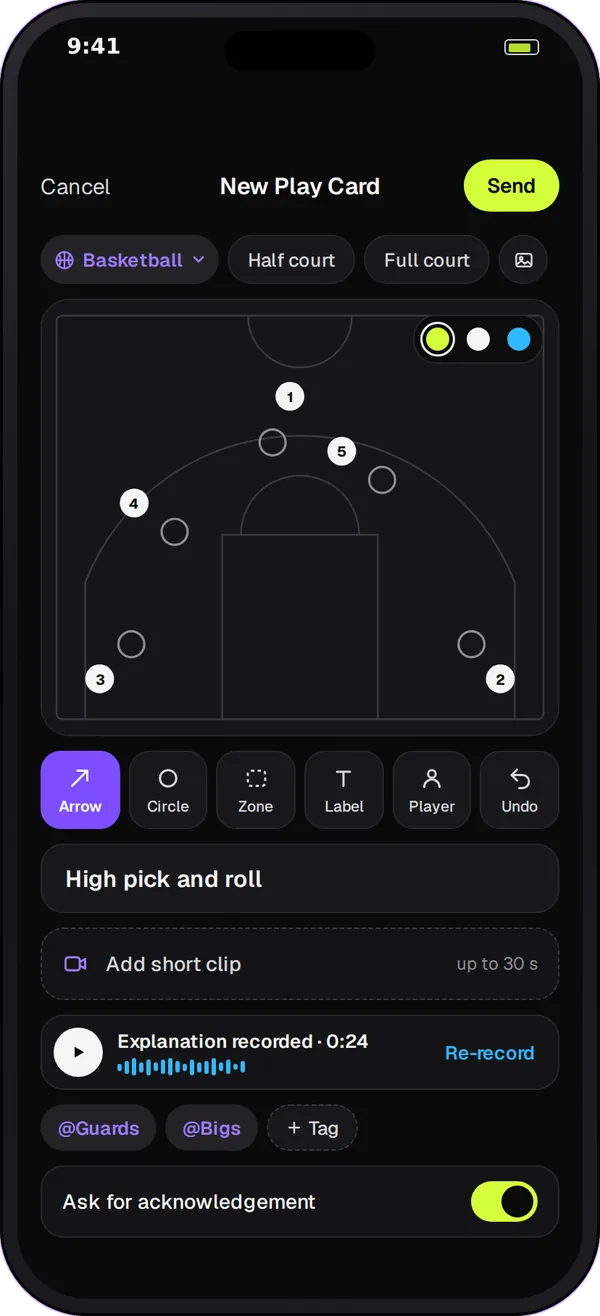
The basketball boards
Half court
For half-court sets: motion, a pick-and-roll, a play for a shooter coming off a screen, or a zone offense against a 2-3.
Full court
For presses and press breaks, transition lanes and where everyone runs after a made basket.
Baseline inbound
For plays under your own basket, where a good set can mean an easy layup.
Sideline inbound
For late-game and end-of-quarter situations from the sideline, when you need a clean entry pass.
How Team Chat helps with basketball plays
-
Draw with simple tools
Place players, add arrows for cuts and passes, circle the screener, shade the zone you want to attack and add labels such as "1" for the point guard. Undo takes back the last mark.
-
Tag the players
Tag the players the play is for, for example the guards on a press break, and post it in the team channel or a guards' space.
-
See who has it
Each player answers Got it, Need help, Review again or with a question. You know before practice who needs a walkthrough, and you can resend the card to follow up.
-
Keep the playbook in one place
Your plays sit in the team's chat history next to the schedule changes and game-day rooms, instead of in a separate drawing app nobody opens.
Send a basketball play in 4 steps
-
Pick the board
Open a Play Card and choose the half court, full court, baseline inbound or sideline inbound board.
-
Draw the set
Place the five players, then add an arrow for each cut, pass and screen in the order they happen.
-
Name it and tag players
Use the name you call on the court, such as "Box" or "Floppy", add a one-line note and tag the players involved.
-
Send it and run it at practice
Post it two days before practice, read the Need help answers, then walk the play with the card open on a phone or tablet.
A starter playbook for a youth team
| Situation | Board | What to draw |
|---|---|---|
| Half-court offense | Half court | Your base motion: spacing spots, cuts and the first pass |
| Against a zone | Half court | Where the gaps are and who flashes to the high post |
| Press break | Full court | Inbounder, two outlets and the safety valve |
| Under your basket | Baseline inbound | A box set with a screen for your top shooter |
| Sideline, late game | Sideline inbound | One entry option and one backup |
| Defense | Half court | Man-to-man help positions or your zone shape |
Keep it small. Most youth teams run better with a few plays they know than a long list they half remember.
Questions
Play Cards come with Team Chat in Play 2 Earn Sports. Starter is free for clubs with up to 10 teams, and players join free, so you can draw and share plays without paying for a separate app.
No. A Play Card is a still diagram. For a play with several phases, send one card per phase in order, for example the entry, then the screen, then the shot.
The team's coaches post Play Cards. Players answer them with Got it, Need help, Review again or a question, which keeps the team's playbook in the coach's hands.
Yes. The board follows the team's sport, with boards for 18 sports, including soccer, football, hockey, volleyball and lacrosse. See the tactics board app page for the full list.
No store download is needed. Team Chat runs in the Play 2 Earn Sports web app on a phone, tablet or computer. There is no separate Team Chat app in the App Store or Google Play yet.
