


On this page
What a match day app does
A match day app puts everything a team needs for one game in one place, from the night before to the final whistle. Instead of scrolling a group chat for the arrival time, players and parents open the game's room and see the details at the top, with the chat for that game underneath.
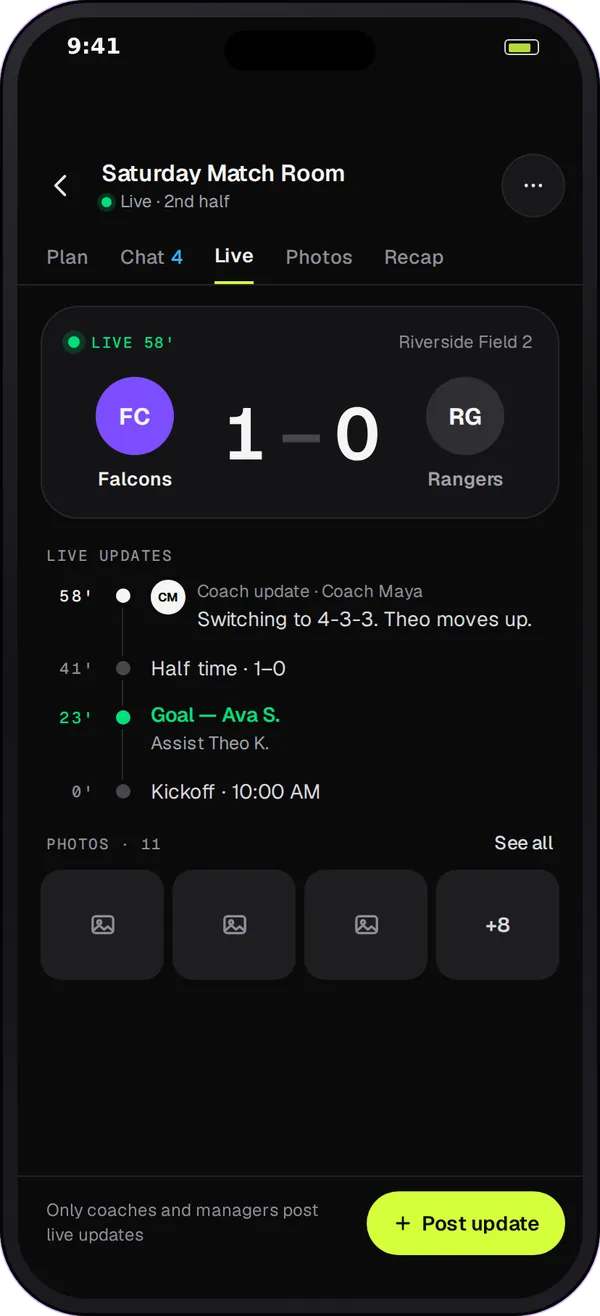
How Team Chat Game Mode works
-
A room for the game
The coach creates an event room for a game on the team's schedule. The room is tied to that event, so its details come from the schedule rather than from someone retyping them.
-
The countdown and the details
Game Mode shows a countdown using your sport's word, such as kickoff for soccer or puck drop for hockey. Below it are the venue, the arrival time and whether the team wears its home or away kit. If the club hasn't set an arrival time or kit, the room shows a dash instead of a guess.
-
Who's coming
Game Mode shows how many players on the roster have said yes, how many have said no and how many haven't answered yet, so the coach knows before warm-up whether they have enough players.
-
Live updates for the people who can't be there
Coaches and club admins can post kickoff, goals, half time, full time and short updates. Parents at work or grandparents at home follow along in the room. These updates are for the team; they aren't the official result, which the club still enters and confirms in the usual way.
-
Parents can follow along
Linked parents and guardians can read their child's event room without posting in it, so the team's game-day chat stays with the players and coaches.
Run game day in 4 steps
-
Set the details in the schedule
Make sure the game has the right venue, arrival time and home or away kit, because Game Mode reads them from the event.
-
Open the event room
Create the game's event room a few days ahead and post one announcement with anything unusual, such as a new field or an early arrival.
-
Check who's coming
The day before, look at the yes, no and waiting numbers and follow up with the families who haven't answered.
-
Post the game as it happens
Post kickoff, the goals, half time and full time. After the game, ask a huddle question and close the room's chat with a thank-you.
Game day checklist for coaches
- Venue, arrival time and kit are set on the event.
- The event room is open and the game-day announcement is acknowledged.
- You know your numbers: yes, no and still waiting.
- Carpools are sorted with an action card if the game is away.
- One adult is posting live updates, so the coach can coach.
- A post-game huddle question is ready for the ride home.
Questions
Game Mode comes with Team Chat in Play 2 Earn Sports. Starter is free for clubs with up to 10 teams, and players and families join free.
Yes, when the coach or a club admin posts updates. Linked parents and guardians can read their child's event room, so they see kickoff, goals, half time and full time as they're posted.
No. Live updates in the room are for the team and families. The official result is still entered and confirmed through the club's usual results flow, so a quick in-game update can't change a league table.
The countdown uses your sport's word, such as puck drop for hockey or tip-off for basketball, and the room shows the venue, arrival time and kit the same way for each sport. Live update types are kickoff, goal, half time, full time and a general update.
No store download is needed. Team Chat runs in the Play 2 Earn Sports web app on a phone or computer and can be added to the home screen. There is no separate Team Chat app in the App Store or Google Play yet.
