


On this page
How coaches communicate with players
Most coaching talk happens in three places. The team channel is for everyone: plans, reminders and shout-outs. Smaller groups handle position or training work. Private conversations are for one player: feedback, a role change, a check-in. A coach messaging app should make all three easy and keep the private ones safe for young players.
The safe-sport rules, built in
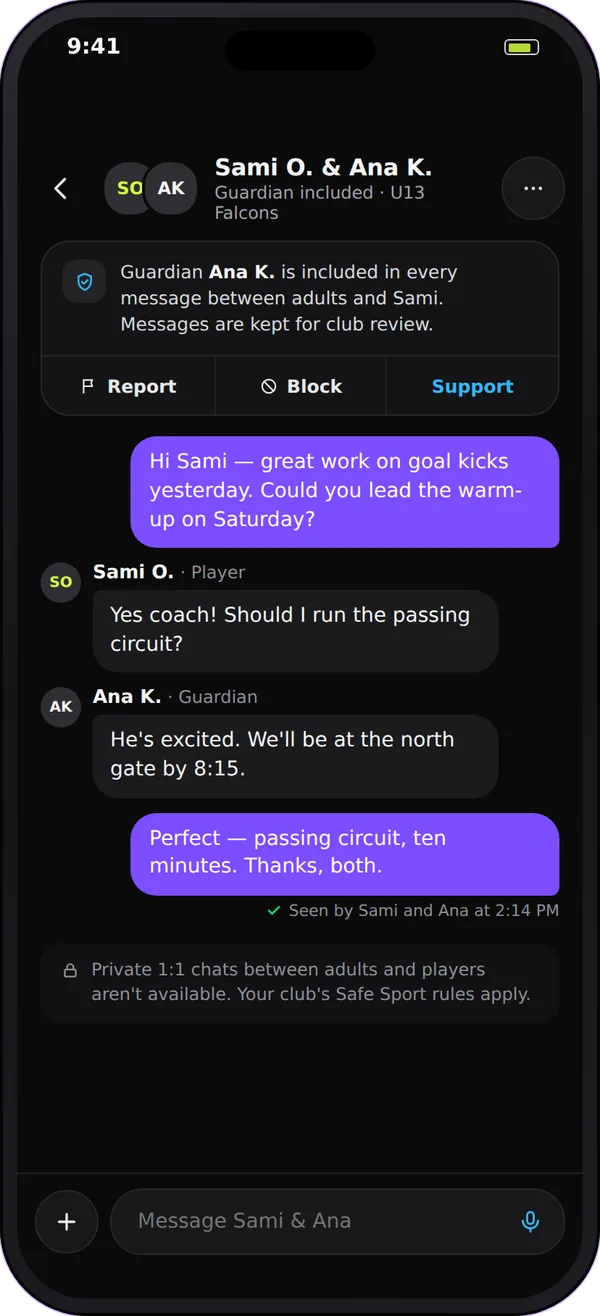
Many club policies, and Canada's Rule of Two, ask that an adult is never alone in a private conversation with a young player. Team Chat is built around that rule:
- A parent in every adult-to-minor chat. When a coach starts a private chat with a player under 18, the player's linked parent or guardian joins it, and can't be removed.
- A smaller circle for younger players. Players under 14 can only message their own teammates privately. Their own coach can message them only with the parent copied, and if no parent is linked the chat isn't allowed.
- Only the team's adults. An adult can only start a private chat with a player on a team they coach or play on, or with their own child. Being club staff isn't enough.
- Unknown age counts as a minor. If a player's age isn't on file, Team Chat treats them as under 18.
- Guardians can read along. Parents can read their child's Team channel, event rooms and spaces their child is in, without posting there.
- Report and block. Anyone can report a message to the club's owner and managers, or block a person.
Check your own club's policy too; these rules support it, they don't replace it.
How Team Chat helps coaches talk to players
-
Voice notes
Record a voice note of up to two minutes for a quick explanation on the drive home. The sender can fix the transcript, so players can read it too.
-
Play cards
Draw a play on your sport's board, tag the players and see who answers Got it or Need help.
-
Spaces for small groups
Create a space for the goalkeepers, the defenders or an extra skills group, so position talk doesn't flood the team channel.
-
Read receipts
See how far each person has read in a conversation, so you know whether a player has seen your message before practice.
-
Quiet hours
Set quiet hours so team messages don't buzz players and parents late at night, and mute a busy space without leaving it.
-
Huddles after games
Ask the team a question after a game. Players can answer anonymously, and you choose which answers to share back as a team recap.
Start messaging your players in 4 steps
-
Set up the team
Start a free club account, add your team and make sure you're listed as a coach. Each team gets Team, Coaches and Parents channels.
-
Link every guardian
Invite players and link each parent or guardian to their own child. That link is what brings a parent into private chats with a minor and lets parents read along.
-
Agree the message plan
Tell players and parents what goes where: plans in the team channel, position work in spaces, one-to-one feedback in private chats with a parent included.
-
Set your quiet hours
Turn on quiet hours for your own account, so you aren't answering messages late at night, and tell families when you reply.
A week of coach messages
| When | Where | Example |
|---|---|---|
| Monday | Team channel | "This week: Tuesday practice, Thursday film, Saturday game. Please acknowledge." |
| Tuesday | Defenders' space | A play card for the new back-line shape |
| Wednesday | Private chat (parent included) | "Sam, we'd like you to try center back on Saturday. Questions?" |
| Friday | Team channel | A voice note: "Three things for tomorrow" |
| Sunday | Huddle | "What's one thing we did well?" |
Coach messaging checklist
- Post team plans in the team channel, not in private chats.
- Use private chats for one player's feedback, and expect a parent in them for under-18s.
- Keep messages to agreed hours, and set quiet hours on your own account too.
- Use spaces for position groups instead of side group texts.
- Never move a conversation with a minor to a personal number or another app.
- Report anything that worries you to the club.
Questions
Look for an app that keeps team talk with the team, gives you small groups for positions or training, and builds in the safe-sport rule for young players. Team Chat does this with team channels, spaces, and a parent added to any private chat between an adult and a player under 18.
Yes, with a safeguard. If the player is under 18, their linked parent or guardian joins the conversation and can't be removed. For players under 14, the coach's message copies the parent every time, and if no parent is linked to the player the private chat isn't allowed; use the team channel instead.
Team Chat is designed so an adult is never alone in a private chat with a minor: a parent or guardian is added, and guardians can read the spaces their child is in. That supports the Rule of Two, but your club is still responsible for its own safeguarding policy.
No. Players and parents reach the coach through Team Chat, by their role on the team, so coaches don't hand out personal numbers.
Play 2 Earn Sports is free for clubs and leagues, with a $3.99 per-player fee at registration, and Team Chat comes with it. A coach running one team can start a free club account for that team.
