


On this page
What a tactics board app is for
A tactics board app replaces the whiteboard in the locker room. Coaches use it to show a set piece, a formation, a press or a play, so players can see where to stand and where to move. The drawing is only half the job, though. The other half is getting it in front of the right players before the next practice or game, and knowing they understood it.
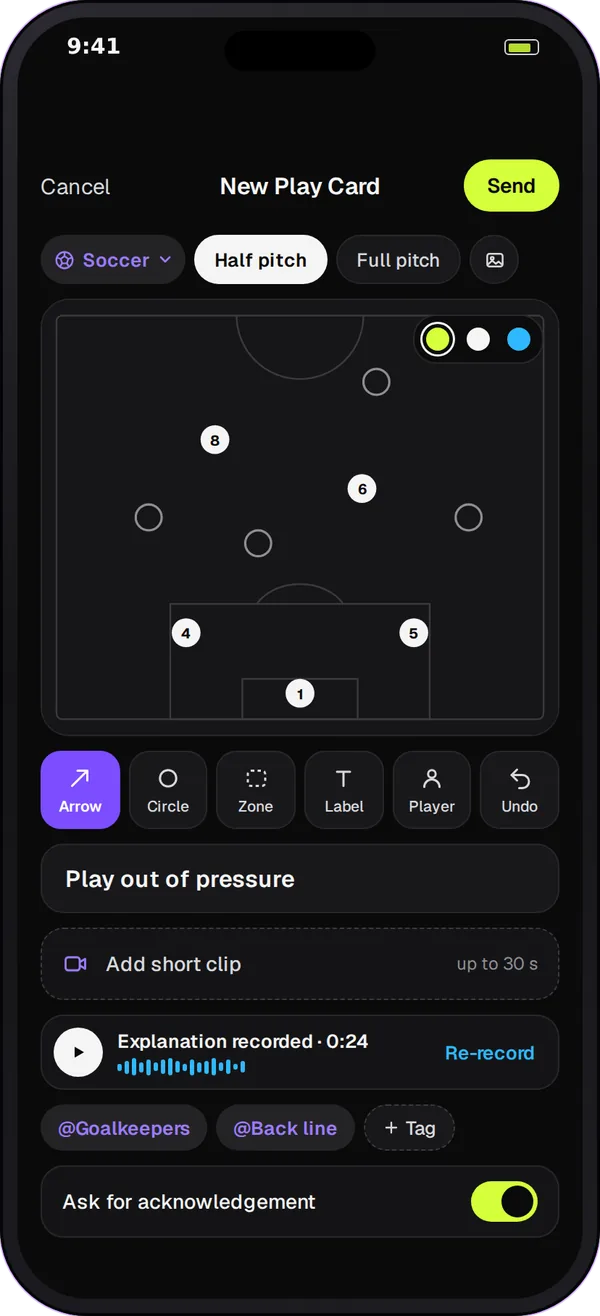
How Team Chat Play Cards work
-
Boards for your sport
The board follows the team's sport. A soccer team gets a half pitch, a full pitch, a 9v9 pitch, the final third, a corner kick and a free kick. Football gets the red zone, the full field, the line of scrimmage and kickoff. Hockey gets half and full rinks, the defensive zone and the faceoff circle. Every sport also has a blank board, and you can upload your own image.
-
Simple drawing tools
Place players, draw arrows for runs and passes, circle a key player, shade a zone and add labels. Undo takes back the last mark.
-
Tag the players it's for
Tag the players the play is about. The card is posted in the team channel or in a space, such as the defenders' or the set-piece group.
-
Answers, not just views
Each player answers Got it, Need help, Review again or with a question. The coach sees the tally and who needs a hand, and can resend the card as a follow-up before practice.
Draw and send a play in 4 steps
-
Choose the board
Open a Play Card in the team channel or a space, and pick the board, for example the corner kick for a set piece.
-
Draw the play
Place your players, add arrows for each run, circle the target and label anything players should remember.
-
Add a title, a note and tags
Give the card a short title and one or two lines of explanation, and tag the players involved.
-
Send it and check the answers
Post it and watch the answers come in. Talk to anyone who taps Need help before practice, and resend the card if some players haven't answered.
Sports with their own boards
| Sport | Boards |
|---|---|
| Soccer | Half pitch, full pitch, 9v9 pitch, final third, corner kick, free kick |
| Football | Red zone, full field, line of scrimmage, kickoff |
| Basketball | Half court, full court, baseline inbound, sideline inbound |
| Hockey | Half rink, full rink, defensive zone, faceoff circle |
| Field hockey | Half pitch, full pitch, shooting circle, penalty corner |
| Rugby | Half pitch, full pitch, lineout, scrum |
| Lacrosse | Offensive half, full field, crease |
| Volleyball | Full court, half court, serve receive |
| Baseball | Infield, full field, outfield |
Boards are also there for tennis, golf, swimming, track and field, gymnastics, figure skating, wrestling, boxing and mixed martial arts, so 18 sports in all.
Tips for plays players remember
- One idea per card. A corner routine and a press are two cards.
- Tag the players the play is about, so they know it's for them.
- Keep the note to two lines: what triggers the play and the one thing that makes it work.
- Send it two days before practice, not the night before.
- Walk through it at practice with the card open on a phone or tablet.
- Read the Need help answers first; they tell you what to coach.
Questions
Play Cards come with Team Chat in Play 2 Earn Sports. Starter is free for clubs with up to 10 teams, and players join free. You don't need a separate tactics app to share plays with your team.
Yes. The board follows the team's sport, so a soccer team draws on pitches and set pieces, and a football team draws on the red zone, the line of scrimmage or the full field. Basketball, hockey, rugby, lacrosse and other sports get their own boards too.
No. A Play Card is a still diagram with players, arrows, circles, zones and labels. For moves that need more steps, many coaches send two or three cards in order, one per phase of the play.
The team's coaches post Play Cards in the team channel and in spaces. Players answer them, so the team's playbook stays in the coaches' hands.
Team Chat runs in the Play 2 Earn Sports web app, so Play Cards open on a phone, tablet or computer browser. There is no separate Team Chat app in the App Store or Google Play yet.
