
On this page
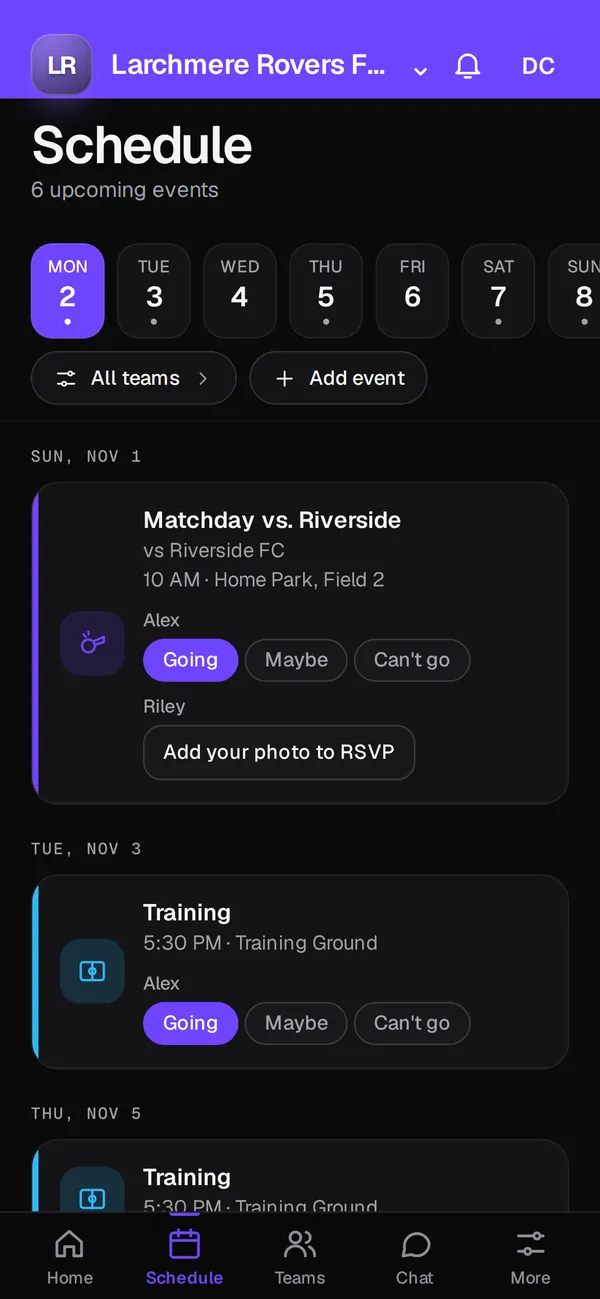
A branded club app puts your club's name, logo and colours on the app your families open for schedules, chat and team news. Club OS by Play 2 Earn Sports is that app: Home, Schedule, Chat, Teams and More tabs in your club's look, with a button into the full Play 2 Earn Sports dashboard on the same login. The features run on Play 2 Earn Sports, in the web app on any phone or computer.
Why clubs want their own app
Most clubs send families into an app that carries someone else's name. Parents end up asking which app the U11 team uses, and the club's identity sits behind a vendor's logo. A branded app gives families one place that looks like the club they joined. It also gives the club one front door for schedules, messages and registration, instead of a different link for each team.
How Club OS puts your club on the home screen
-
Your logo and colours
Club OS takes your club's logo and colours and uses them across the app. The preview pulls both from your club's website, so you can see the result before you set anything up.
-
Five tabs families can find their way around
Home shows what's next. Schedule holds games, practices and events. Chat is Team Chat, with team, coaches and parents channels. Teams lists your teams and rosters. More holds the rest.
-
One login into the full dashboard
An "Open Play 2 Earn Sports" button takes admins and coaches into the full web dashboard with the same login, for the jobs that need a bigger screen.
-
Running today on Play 2 Earn Sports
Everything inside Club OS runs on Play 2 Earn Sports, which clubs use today in the web app on any phone or computer. You can set up your club now.
What's ready today
| Part | Status |
|---|---|
| Teams, rosters and roster import | Ready today in the Play 2 Earn Sports web app |
| Schedule, RSVP and attendance | Ready today |
| Team Chat with safe-sport rules | Ready today |
| Club fees tracked per family | Ready today |
| Paying registration online through Club OS | Ready today, once your club connects its Stripe account |
What your families see
A parent opens the app and sees your crest, not a vendor's. Their child's next game is on Home with the venue and the time. If the game moves, they get a notice in the app, with email and push where available. Team Chat is one tab away, and each guardian is linked to their own child, so they see the right team's conversations. Players and families join free.
Coaches see the same club look, plus the tools they need: RSVPs for the next practice, attendance, lineups and formations. Club admins get the full dashboard one tap away.
Set up your club's app in 4 steps
-
Preview it with your website
Type your club's website address into the preview. Play 2 Earn Sports pulls your logo and colours and shows your club's app with sample data. Nothing is saved.
-
Request a demo
Request a demo and we'll set your club up on Play 2 Earn Sports. Joining is free.
-
Load your teams and roster
Add teams by hand, or import your roster from a spreadsheet (CSV) exported from TeamSnap, LeagueApps, SportsEngine or another system, using the column map.
-
Share your join link
Send families your club's join link. They join free, link to their children, and find the schedule and Team Chat waiting.
Questions
No. Everything inside Club OS runs in the Play 2 Earn Sports web app on any phone or computer.
Club OS is free to join, including the branded app, your roster, the schedule and Team Chat. A $3.99 per-player fee applies at registration. The pricing page has the details.
Yes. That's the point of Club OS. The preview pulls them from your website, and you see the result before anything is set up.
No. Each person has one Play 2 Earn Sports login. The same login works in Club OS and in the full dashboard.
Club OS runs on Play 2 Earn Sports, which supports 18 sports, with player profiles, stats and awards for each one.
