

On this page
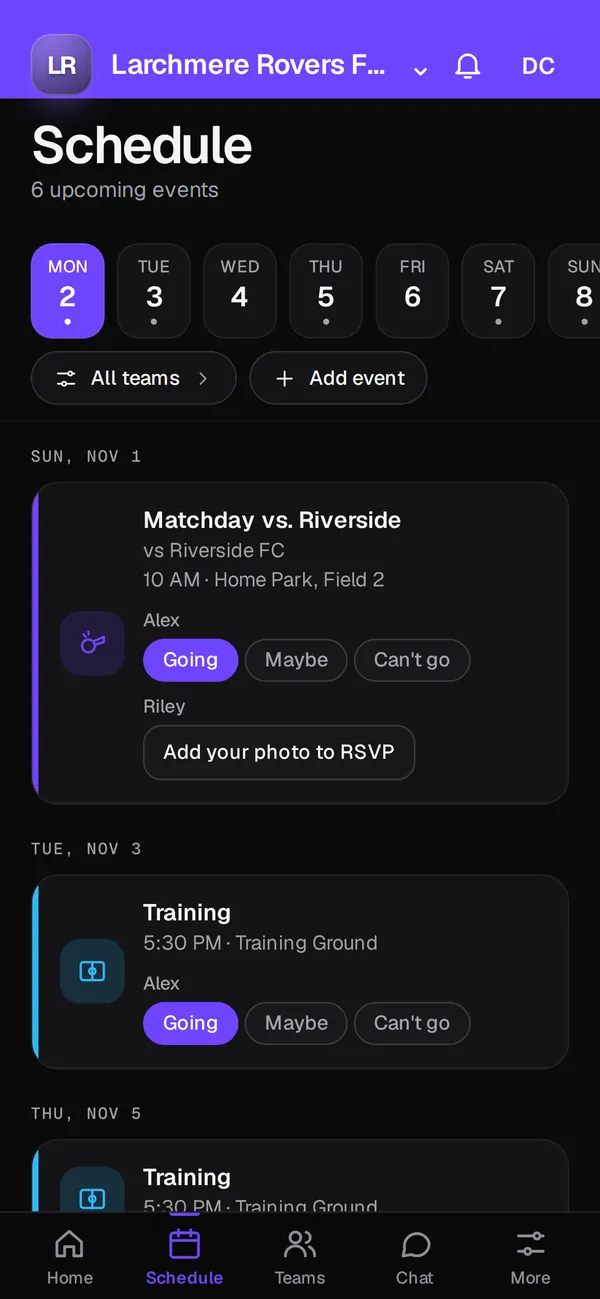
Most clubs run on a stack: a group chat per team, a roster spreadsheet, a shared calendar, a sign-up sheet for snacks and a separate stats app. Club OS by Play 2 Earn Sports puts those jobs in one app with your club's logo and colours: Home, Schedule, Chat, Teams and More. The features run on Play 2 Earn Sports, in the web app on any phone or computer.
The stack most clubs run today
Each tool does its own job, but none of them talk to each other. A practice moves in the calendar, and someone has to post it in the group chat. A new player joins, and someone has to add them to the spreadsheet, the chat and the snack list.
| Job | What clubs often use | In Club OS |
|---|---|---|
| Messages | A group chat per team | Team Chat with team, coaches and parents channels |
| Roster | A spreadsheet | Teams and rosters with positions and edit permissions |
| Schedule | A shared calendar | One schedule for games, practices and events |
| Who's coming | Replies in the chat | RSVP (going, maybe, can't go) with reminders |
| Snacks and carpools | A sign-up sheet | Action cards in Team Chat |
| Club fees | A spreadsheet and bank notices | Fees tracked per family, with e-transfers recorded |
| Stats | A separate stats app | Player profiles, stats and awards for every sport |
How Club OS brings the pieces together
-
A schedule that sends its own notices
Games, practices and events live in one schedule, with venues and fields. When a game changes, families get a notice in the app, with email and push where available. Double-booked fields and teams are flagged.
-
Team Chat next to the schedule
Announcements people acknowledge, polls, action cards for availability, carpools, snacks and volunteers, play cards drawn on your sport's board, and direct messages, all with safe-sport rules for minors.
-
Rosters that drive everything
The roster decides who sees which schedule and which channels. Guardians are linked to their children, and roster permissions decide who can view or edit.
-
Fees in the same place
Club fees are tracked per family, e-transfers that families submit are recorded, and you get a clear view of who's unpaid.
-
Coach tools and stats
A coach dashboard, lineups and formations, player evaluations, attendance, and stats and awards for 18 sports.
What it doesn't replace
Be clear-eyed about the gaps before you switch. Club OS doesn't do live video streaming, a separate e-signature service or SMS texting. Everything inside it runs in the Play 2 Earn Sports web app on any phone or computer.
What it costs
Club OS is free to join. A $3.99 per-player fee applies at registration. Your club is never invoiced, and it can cover the fee or pass it on to families.
Move your club into one app in 4 steps
-
Preview your club's app
Type your website address to see your app in your logo and colours with sample data. Nothing is saved.
-
Import your roster
Upload a roster CSV exported from TeamSnap, LeagueApps, SportsEngine, TeamLinkt, Sports Connect, PowerUp or another source, and match the columns.
-
Import your schedule
Bring in your existing schedule from a calendar link, an .ics file or a CSV, and check the preview before anything is saved.
-
Retire the old tools
Post one announcement in your old group chats with the switch date, and use the acknowledgements in Team Chat to see who has moved.
Questions
For schedules, rosters, team messages, RSVPs, sign-ups, online registration and fee tracking, yes. For live video, a separate e-signature service and SMS, you'll still need something else.
No. Rosters and schedules come in from CSV files and calendar links, with a column map or a preview first.
Yes. Play 2 Earn Sports supports 18 sports, not just one.
Yes. Everything runs in the Play 2 Earn Sports web app on any phone or computer.
Club OS is free to join. The only charge is a $3.99 per-player fee when a player registers and pays through it.
