

In this guide
- Why league volunteers burn out
- Step 1 — map the season's jobs
- Step 2 — one owner and one backup per job
- Step 3 — push club work back to clubs
- Step 4 — batch the work and set office hours
- Worked example — one secretary's jobs, shared between five people
- Step 5 — write each job down
- How Play 2 Earn Sports supports this
- Frequently asked questions
- Related guides
An illustrative planning scenario: One league secretary handles registrations, scheduling, referee assignments, score chasing and messages from every club. If that person steps away, who takes over? How can the league reduce volunteer workload?
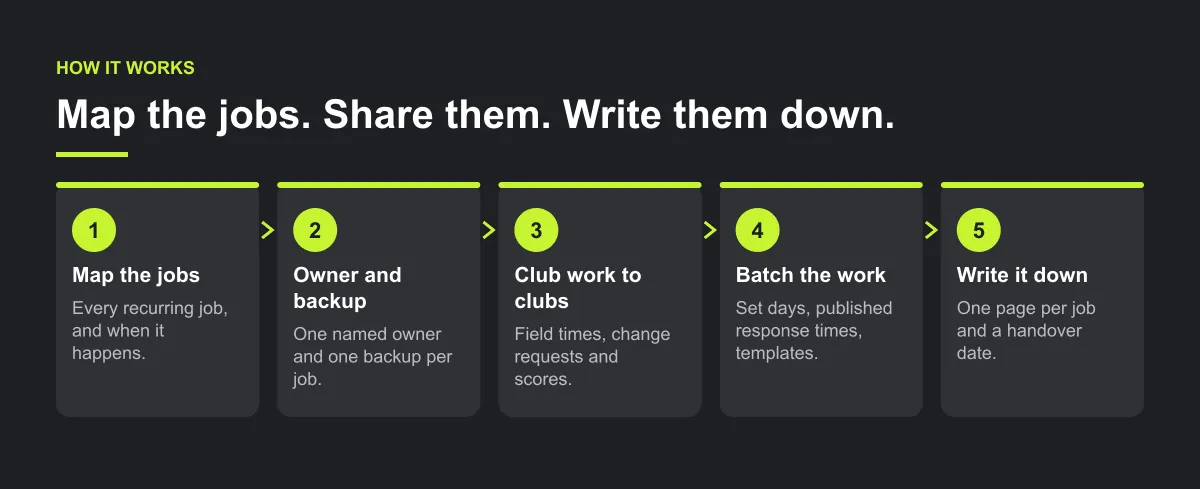
Why league volunteers burn out
- One person holds everything, because it was easier to do it than explain it.
- Every request comes to one inbox, at any hour, in any channel.
- The league does work the clubs could do: entering field times, chasing scores, relaying messages.
- Nothing is written down, so nobody can step in, and nobody wants to take over.
- Money and admin are mixed, so the person who knows the schedule also answers every fee question.
Step 1 — map the season's jobs
List every recurring job and when it happens. A league office can have:
| Job | When |
|---|---|
| Team and club registration | Pre-season |
| Season and division setup | Pre-season |
| Building and publishing the schedule | Pre-season |
| Change and reschedule requests | All season |
| Referee assignment | All season |
| Results, standings and disputes | All season |
| Club communications | All season |
| Money: fees, refunds, referee fees | All season |
| Playoffs and season wrap-up | End of season |
Step 2 — one owner and one backup per job
- Give each job one named owner and one backup.
- Small leagues can combine jobs, but never all of them in one person.
- Keep money with a named treasurer or the league administrator, separate from the schedule.
- Give people access only to what their job needs, and only for the divisions they run.

Step 3 — push club work back to clubs
The league office shouldn't type what clubs already know:
- Clubs enter their own field, rink or court times and blackout dates.
- Clubs submit change requests in one format, not by phone.
- The home team enters the score, and the away team confirms it.
- Each club names one scheduler contact, so the league talks to one person per club.
Step 4 — batch the work and set office hours
- Answer change requests on set days, for example Tuesday and Thursday.
- Publish response times for clubs, so a reply tomorrow isn't late.
- Use one channel per kind of request, not texts to someone's personal phone.
- Keep templates for the messages you send every week: rainouts, schedule published, results deadline.
Illustrative example, not a specific league.
A league of fourteen clubs could split its office into four jobs: scheduler, registrar, referee coordinator and administrator. Clubs could enter their own field times and scores. Each job gets a backup so a handover does not depend on one person.
Worked example — one secretary's jobs, shared between five people
Illustrative example, not a specific league. The hours are planning estimates, not measurements.
A league of 14 clubs runs four divisions (U8, U10, U12, U14). Its secretary estimates 13 hours a week in season: schedule changes 4, referee assignment 3, results and disputes 2, club messages 2, money 2. The league splits the jobs:
| Job | Owner | Backup | Access (base role and switches) | Divisions | Hours a week in season |
|---|---|---|---|---|---|
| Schedule and change requests | Scheduler A | Scheduler B | Scheduler | U8, U10 | 2 |
| Schedule and change requests | Scheduler B | Scheduler A | Scheduler | U12, U14 | 2 |
| Referee assignment | Referee coordinator | Scheduler B | Referee coordinator (backup: Referee assignments switch on) | All | 3 |
| Team and club registration | Registrar | Administrator | Registrar | All | 0 (pre-season job) |
| Results, standings and disputes | Administrator | Scheduler A | Holds every switch (backup: Results & standings switch on) | All | 2 |
| Club communications | Administrator | Registrar | Holds every switch (backup: Communications switch on) | All | 2 |
| Money: fees, refunds, referee fees | Administrator | Board treasurer, outside the app | Administrator only; the backup can be given Fees (view only) | All | 2 |
| Total | 13 |
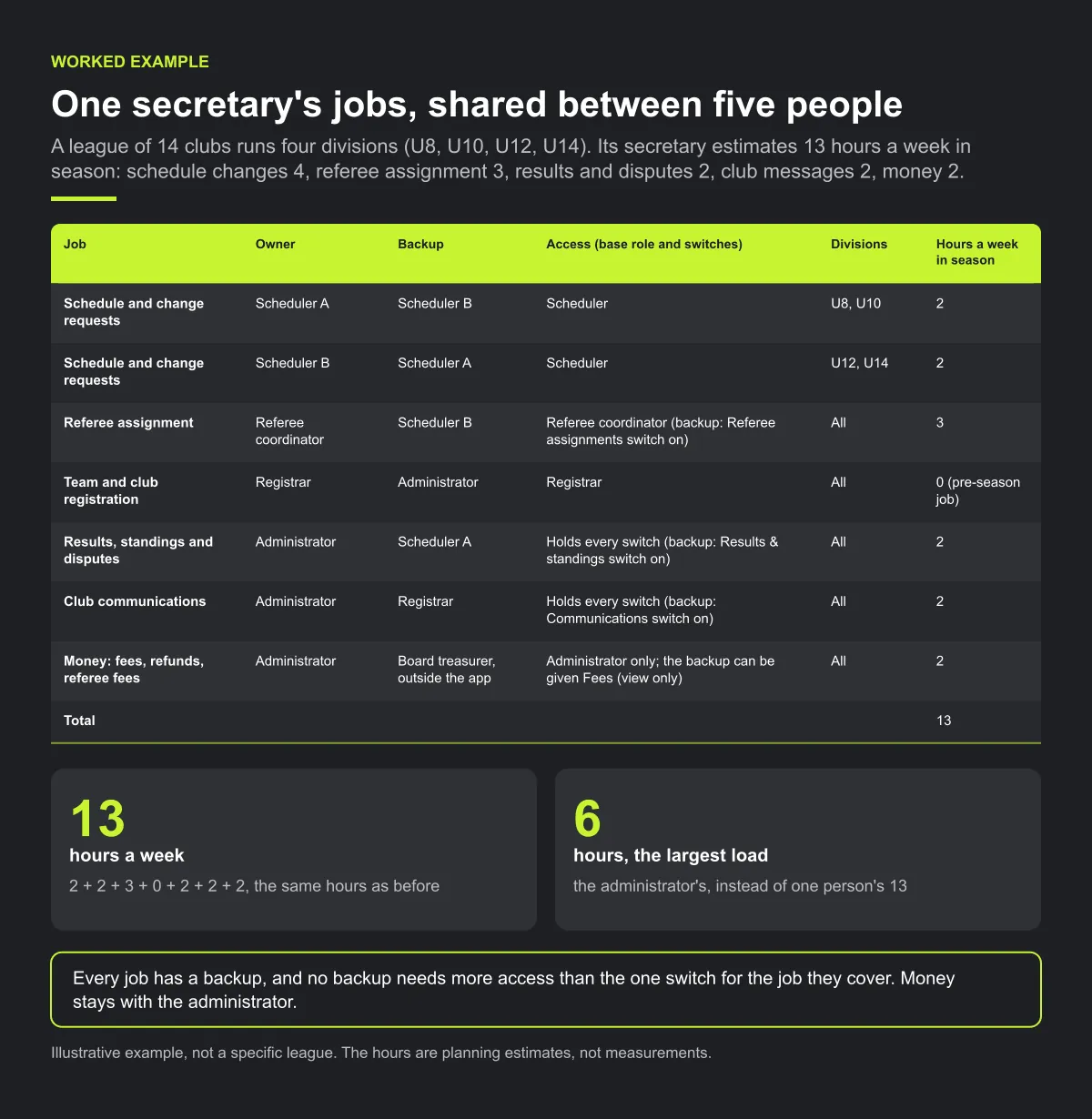
Check: 2 + 2 + 3 + 0 + 2 + 2 + 2 = 13, the same hours as before, but the largest load is now the administrator's 6 hours instead of one person's 13. Every job has a backup, and no backup needs more access than the one switch for the job they cover. Money stays with the administrator.
The next step is to take hours out, not just share them. When clubs enter their own field, rink and court times, blackout dates and scores (Step 3), the schedulers and the administrator have less re-typing and chasing to do.
Checklist: sharing the league office
- Every season job listed, with when it happens.
- One owner and one backup per job; nobody holds every job.
- Money with the administrator or a named treasurer, separate from the schedule.
- Access limited to each person's job and divisions.
- Club work (venue times, blackouts, scores) handed back to clubs.
- Set days and response times for requests; templates for weekly messages.
- One page per job, and a handover date.
Common mistakes
- Splitting jobs without backups. One person's holiday then stops a job completely.
- Giving everyone full access "to be safe". Wider access means more people can change things by accident.
- Moving money tasks to whoever has time. Keep fees and refunds with one accountable person.
- Sharing the work but keeping the inbox. If every request still comes to one person, the load hasn't moved.
Step 5 — write each job down
- One page per job: what it is, when it happens, where things live, who to ask.
- A handover date at the end of each season.
- Term limits and deputies, so every job always has someone learning it.
- Thank people publicly and ask what support would make their work sustainable.

How Play 2 Earn Sports supports this
- Four staff roles to share the office. League manager runs the league day to day. Scheduler builds and changes the schedule and answers change requests. Registrar reviews and approves club and team registrations. Referee coordinator assigns referees to games.
- Switches, not all-or-nothing. Each role pre-ticks permission switches, and the administrator can turn individual switches on or off, such as schedule control, fixture times, change requests, results and standings, registrations, referee assignments and club chat.
- Limit staff to their divisions. A scheduler for the younger divisions only sees and changes those.
- Invite only. Staff are added from the "League staff & permissions" screen.
- The fee ledger stays under owner or administrator control. There is no Treasurer staff role; the most league staff can be given is fees as view only.
- Clubs do club work. Clubs manage their own field availability and blackout periods on the league page, send change requests, and enter and confirm results.
See league staff roles and permissions in a demo league.
Frequently asked questions
Map every recurring job, give each one an owner and a backup, push work clubs can do back to clubs, batch requests on set days with published response times, and write each job down so the next person can pick it up.
A league can split the work between a league administrator, a scheduler, a registrar, a referee coordinator and someone responsible for money. Small leagues combine some jobs, but not all of them in one person.
Give each kind of request one channel and one format, ask each club to name one scheduler contact, have clubs enter their own field times and scores, and publish response times.
Share the work before someone burns out, write each job down, set a handover date and term limits, recruit deputies, and thank people publicly.
No. Fees, refunds and the ledger stay with the league administrator. The most staff can be given is fees as view only. There is no Treasurer role.
Starter is free for clubs with up to 10 teams. Pro is $49.67 USD a month for 11 to 25 teams. Unlimited is $99.67 USD a month for 26 or more teams. For leagues, Starter is free for up to 10 clubs, League Pro is $97.85 USD a month for 11 to 25 clubs, and League Unlimited is $196.35 USD a month for 26 or more clubs. Every feature is on every plan, and players and parents are always included. See pricing.
Related guides
- League scheduling guides: every league scheduling guide in one place.
- How to build a youth league schedule
- When a coach leaves: the handover checklist
- Club communication standards
- Sports league scheduling software
- Pricing
