

In this guide
- Why season schedules take weeks
- Step 1 — gather four inputs before you place a single game
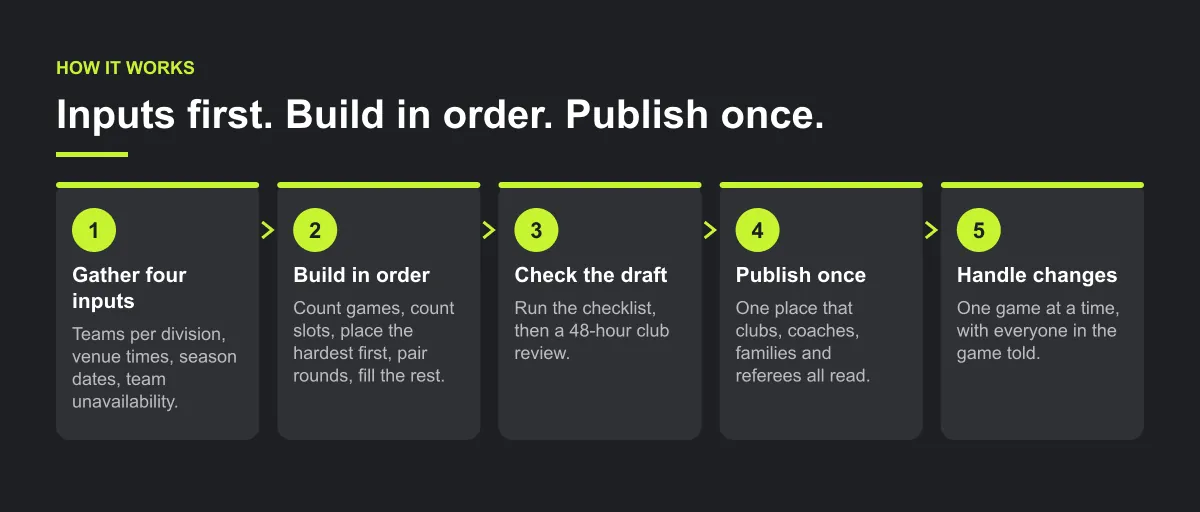
- Step 2 — build in this order
- Worked example — 8 teams, 3 fields, 10 weekends
- Step 3 — check the draft before anyone sees it
- Step 4 — publish once, in one place
- Step 5 — handle changes without starting over
- How Play 2 Earn Sports supports this
- Frequently asked questions
- Related guides
The question league organizers ask: "Every summer I lose two weekends to a spreadsheet. Four divisions, three venues, and every time I fix one clash I make two more. How do I build a youth league schedule without it taking weeks?"
Why season schedules take weeks
- Inputs arrive late. Team counts change, venue permits come in after the build has started, and every late input means rework.
- Games are placed before slots are counted. Nobody checks whether there are enough field, rink or court times for the games needed until week six is empty.
- Checks are done by eye. One double-booked venue or a team playing twice at once slips through and is found on game day.
- Changes live in text threads. After publishing, the spreadsheet and reality drift apart.
Step 1 — gather four inputs before you place a single game
Teams per division.
Final counts, by a fixed date. An odd number means a bye each round, so know it early.
Venues and their available times.
Every field, rink or court you actually hold, with the days, start and end times, and the slot length each age group needs.
Season dates.
First and last game day, and a written list of dates with no games: holidays, school events, tournaments.
Team unavailability.
Ask every club for the dates their teams cannot play, on one form, by one deadline.
Then write down your league rules: games per team, single or double round robin, home and away, and the earliest and latest start time for each age group.
Step 2 — build in this order
- Count the games. In a single round robin with 8 teams, each team plays 7 games and the division needs 28 games in total. With 7 teams, each team plays 6 games, sits out one round, and the division needs 21 games.
- Count the slots. List every venue, date and time you hold. If you have fewer slots than games, fix it now: more venue time, fewer games, or shorter slots.
- Place the hardest first. Divisions with the fewest venue options, the youngest age groups with tight time windows, and teams with the most unavailable dates.
- Pair the round robin, then set home and away so each team gets an even split.
- Fill the remaining slots, then look at who has the early and late times and share them out by hand.
Illustrative example, not a specific league.
Here is an example. A league of 26 teams in four divisions starts placing games in July. By mid-August the under-9s have run out of Saturday morning times and three teams have no home games in October. Counting slots in step 2 would have shown the gap in an afternoon.
Worked example — 8 teams, 3 fields, 10 weekends
Illustrative example, not a specific league.
An under-12 division has 8 teams. The league holds 3 fields on Saturdays, with 2 game slots on each field (9:00 and 10:30), for 10 weekends. The same arithmetic works for rinks, courts or diamonds.
Games needed. A single round robin needs n(n − 1) ÷ 2 games: 8 × 7 ÷ 2 = 28. That is 7 rounds of 4 games, and each team plays 7.
Slots available. 3 fields × 2 slots × 10 weekends = 60 slots, or 6 per weekend.
Capacity check. Compare the total, and then compare one weekend at a time:
| Plan | Games each | Games needed | Rounds | Slots held | Fits? |
|---|---|---|---|---|---|
| Single round robin | 7 | 28 | 7 | 60 | Yes. 7 weekends used, 3 weekends spare, 32 slots free |
| Double round robin | 14 | 56 | 14 | 60 | No. 56 is under 60, but 14 rounds need 14 weekends and only 10 exist |
| 10 rounds (single round robin plus 3 repeats) | 10 | 40 | 10 | 60 | Yes, but no spare weekend for make-ups |
The double round robin passes the total check and fails the weekend check. Two rounds on one Saturday would need 8 games in 6 slots and would have every team playing twice that day. Always run both checks.
Round 1 pairings. Number the teams 1 to 8 and pair the top of the list with the bottom:
| Slot | Field 1 | Field 2 | Field 3 |
|---|---|---|---|
| 9:00 | Team 1 vs Team 8 | Team 2 vs Team 7 | Team 3 vs Team 6 |
| 10:30 | Team 4 vs Team 5 | open | open |
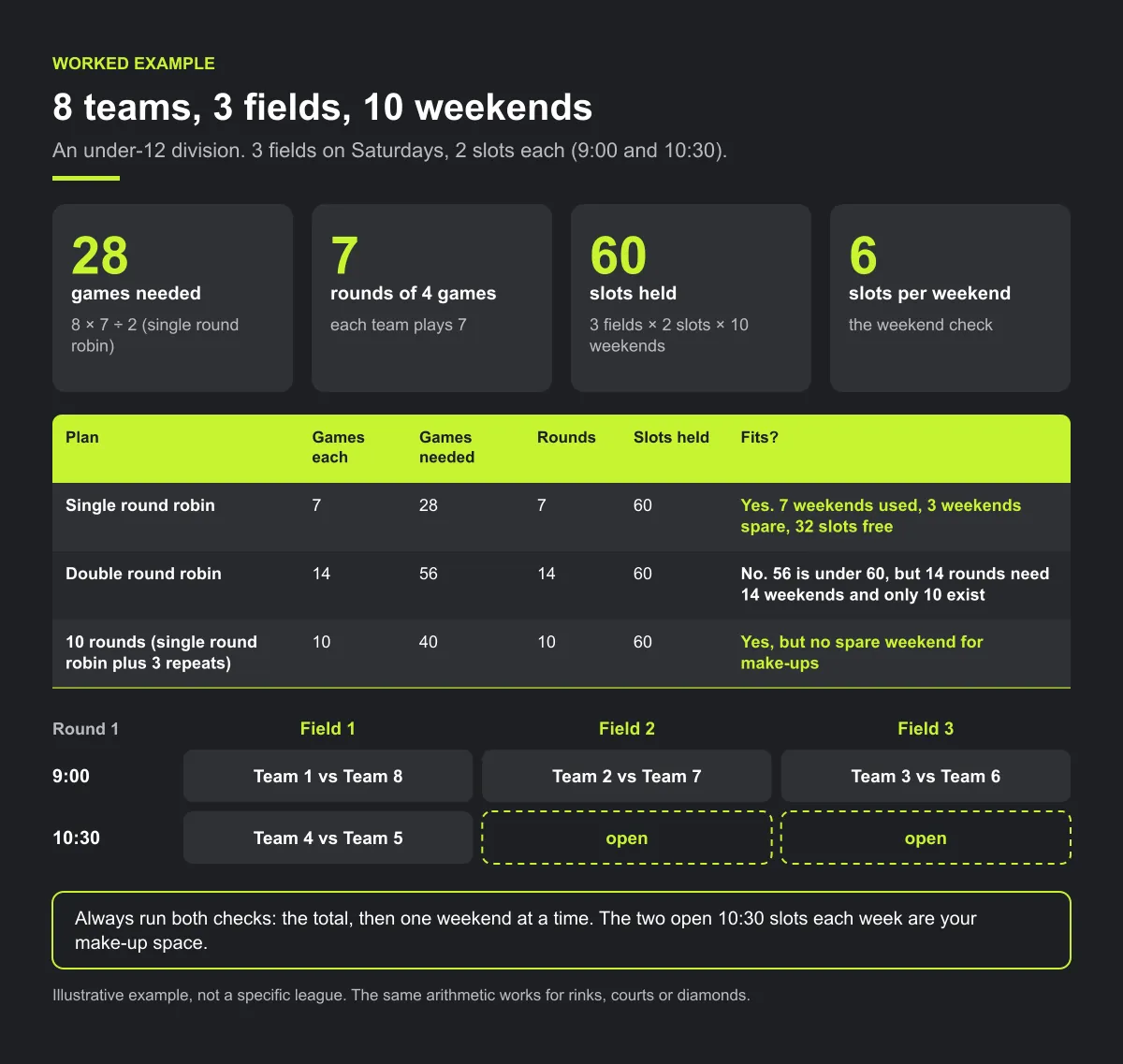
For round 2, keep Team 1 fixed and move every other team one place around the circle (the "circle method"). After 7 rounds every pair has met once. The two open 10:30 slots each week are your make-up space.
Step 3 — check the draft before anyone sees it
Checklist: before you publish the draft
- Games counted and compared with slots, in total and per weekend.
- No field, rink, court or diamond booked twice at the same time.
- No team playing two games at once, or twice on one day unless your rules allow it.
- Every team's unavailable dates respected.
- Home and away within one game for every team.
- Byes spread out, never two in a row for the same team.
- Coaches with teams in two divisions checked by hand.
- Early and late slot counts per team compared, with the gaps evened out.
Then send the draft to each club's scheduler for a 48-hour review of their own teams. Fix, then publish.
Step 4 — publish once, in one place
Announce the publish date in advance, and give clubs a fixed window to raise problems before it. Publish where clubs, coaches, families and referees all read it. From then on, the published schedule is the only version: no spreadsheet copies, no screenshots in chat groups that go out of date. If a club keeps its own calendar, it links to the published schedule rather than retyping it. One source means a moved game only has to change in one place.
Step 5 — handle changes without starting over
- A written change policy. Who can ask for a change, how much notice they give, and who approves it.
- One game at a time. Never rebuild the whole season mid-season.
- Everyone in the game is told. Both teams, their families, the coaches and the referee.
- Make-up games go in a free slot that does not clash with another game. Check the field, both teams, any shared coach and the referee before you save it.
- A cut-off for small requests. For example, no time changes inside 72 hours of the game except for weather or venue closures. Write the number down so every club gets the same answer.

Common mistakes
- Counting slots in total only. A season can have enough slots overall and still not fit, because one round has to fit in one weekend.
- Using every slot. A schedule with no open slots has nowhere to put a rained-out game. Keep spare slots or a spare weekend.
- Publishing before clubs review. Each club knows its own coaches and conflicts. A 48-hour review costs less than a mid-season move.
- Rebuilding after publishing. Re-running the whole season moves games that were fine. Move one game at a time.
How Play 2 Earn Sports supports this
- League auto-scheduling. From your divisions, teams, venues and team availability, it builds a season draft with round robin pairings and home and away balance. You still gather the inputs and review the draft.
- Venue-conflict checks. It flags field and team double-bookings. Coaches with teams in two divisions remain a manual check.
- A published schedule is not regenerated over. Rescheduled games are not wiped out by running the schedule again.
- Change notices. When the league approves a club's request, the clubs and the referee are told. Tell everyone else in the game yourself.
- One connected schedule. Teams roll up to their clubs, and families see their own child's games.
- Standings update from confirmed results.
See a league season built from your divisions and venues.
Frequently asked questions
Gather four inputs first: teams per division, venues and their available times, season dates and team unavailability. Count games and slots, place the hardest divisions first, check the draft, let clubs review it, then publish once.
Each team plays every other team once, so with n teams each team plays n − 1 games and the division needs n × (n − 1) ÷ 2 games. Eight teams means 28 games. A double round robin doubles it.
Find out in step 2, not in week six. Add venue time, reduce games per team, shorten slots where your rules allow, or split the season into two shorter rounds.
Use a written change policy, change one game at a time in the published schedule, make sure everyone in that game is told, including the referee, and place make-ups in a free slot without a clash.
It builds a season draft with round robin, divisions, home and away balance and team availability, and flags field and team double-bookings. You gather the inputs, review the draft and publish it. Once published, it is not regenerated over.
Starter is free for clubs with up to 10 teams. Pro is $49.67 USD a month for 11 to 25 teams. Unlimited is $99.67 USD a month for 26 or more teams. For leagues, Starter is free for up to 10 clubs, League Pro is $97.85 USD a month for 11 to 25 clubs, and League Unlimited is $196.35 USD a month for 26 or more clubs. Every feature is on every plan, and players and parents are always included. See pricing.
Related guides
- League scheduling guides: every league scheduling guide in one place.
- Rainout and field closure process
- Parents keep missing schedule changes
- Sports league scheduling software
- League schedule maker
- Round robin generator
- Pricing
