

In this guide
The question club leaders ask: "We told everyone the game moved. Why did six families still show up at the wrong field?"
An example: what this looks like inside a club
Illustrative example, not a real club.
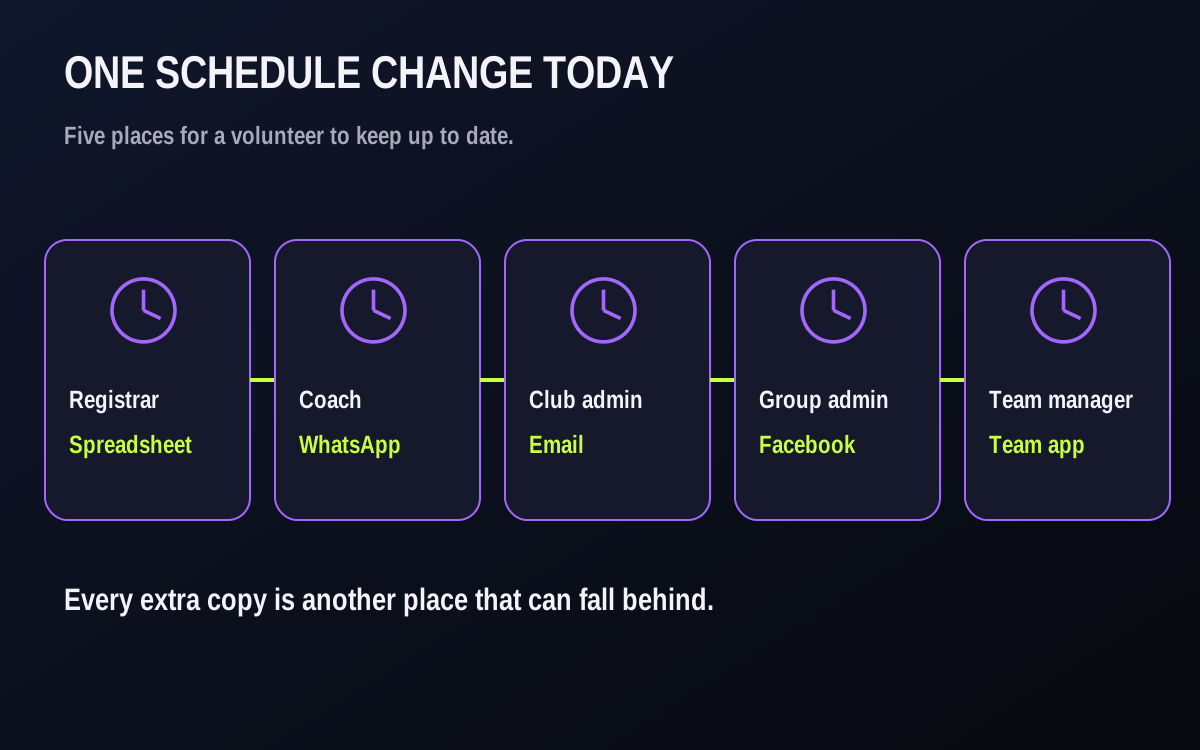
It is Thursday at 4:40 p.m. Rain closes Field 2. The U11 game moves from Saturday at 9:00 to Sunday at 1:30.
- The registrar updates the spreadsheet.
- The coach posts in the team WhatsApp group.
- The club emails the "all families" list, which three families never joined.
- Someone updates the Facebook group on Friday.
- The team app still shows Saturday.
By Saturday morning the coach has answered the same question a dozen times, two families are at the field, and one player misses Sunday because nobody told the parent who actually does the driving.
Nobody did anything wrong. The club has five sources of truth, so it has none.

What it really costs the club
- Coach time and burnout. Every change becomes an evening of replies. For a volunteer coach, that is the part of the job that wears thin first.
- Parent trust. A family that drives to the wrong field, rink or court once can start double-checking everything. A family that does it twice may start looking at other clubs.
- Lost games and forfeits. Short benches and no-shows can follow missed messages.
- Registrations next season. One bad day is not the whole story. What can push a family away is the feeling that the club is disorganized, and communication is where they feel it first.
- Hidden admin. Someone is copying the same change into four tools, and that person may be your most valuable volunteer.
The five-step fix
These five steps work with any reliable set of tools. Test the exact schedule and notice routes before relying on automation.
Pick one source of truth.
Decide where the official club schedule lives and name someone to keep it current. Point other copies to that schedule. If a time elsewhere differs, check the latest event with the named owner before sharing it. Take stale spreadsheets down or mark them as copies.
Name one owner for changes.
Write down who is allowed to move a game and who approves it. One person makes the change, in one place. Name a backup for weekends and holidays, and agree what a coach does when they hear about a change first: they tell the owner, they do not announce it themselves.
Update the schedule, then check the notice.
Change the event first and verify its new date, time and place. Prepare a notice from those confirmed details and compare it with the event before sending. Include the old time, the new time and the field, rink or court. Add a short reason when it helps.
Choose and verify the notice routes.
Different households may check different channels. Use the routes your club has tested for this type of event and the intended recipients. App, email and push availability can vary with account and device settings. If a route is not automatic or confirmed, assign someone to send or call manually.
Close the loop.
Ask for an RSVP on the new time. The coach can see who has answered and who may need a phone call before game day. An unanswered RSVP is not proof the notice was missed. Write these three rules down and share them with families at registration:
- The official club schedule is the reference for the latest confirmed time; ask the named owner if another copy differs.
- Update and check the event first, then send a club notice with the old and new details through confirmed routes.
- For late changes, send promptly and have the assigned coach or manager follow up with families who have not replied.

Worked example — a schedule-change notice and when to send it
Illustrative example, not a real club.
Here is a notice you can copy into any tool. Keep the order the same every time, so families learn where to look.
CHANGED: U12 Blue vs. Westside, Saturday game
Was: Saturday, 9:00 a.m., North Park Field 2
Now: Sunday, 1:30 p.m., North Park Field 4
Why: Field 2 closed by the city after rain.
Arrive by: 1:00 p.m. Same kit as before.
Please do one thing: reply Yes or No to the new time by Friday at 8:00 p.m., so the coach knows who is coming.
The official club schedule shows the latest confirmed time. If an older copy disagrees, please ask the team manager.
The same layout works for a hockey game moved to another rink, a basketball game moved to a different gym or a baseball doubleheader split across two days. Change the place words, keep the order.
Timing matters as much as wording. One approach is to agree on a send-time table and print it in the coach handbook:
| When the change is decided | When the notice goes out | Who follows up, and when |
|---|---|---|
| More than 3 days before | As soon as the schedule is updated | Coach checks who has not replied 48 hours before the game |
| 1 to 3 days before | As soon as the schedule is updated | Coach checks replies the same evening and messages anyone silent |
| Game day, more than 3 hours out | Straight away, then a second short reminder 2 hours before | Team manager phones families who have not replied |
| Inside 3 hours | Straight away, no waiting | Coach or manager phones every family who has not replied |
| Change reversed (game back on) | Straight away, marked "BACK ON" | Same as the row above for the new start time |
Two details make the table work. First, update and verify the schedule before sending, then compare the notice with the current event. Second, follow up with families who have not answered rather than assuming silence means yes.
Checklist: before a changed game is played
- The game shows the new date, time and place in the official club schedule.
- Old copies (spreadsheets, pinned posts) are removed or point to the schedule.
- The notice has the old and new details, and the club records which confirmed routes it used.
- The club checks the linked parent or guardian accounts and includes everyone who needs the update.
- The other team contact and any assigned officials are contacted where applicable.
- Families have been asked to reply to the new time.
- The coach follows up with families who have not replied; a sent notice is not proof it was read.
Common mistakes
- Announcing before changing. If the chat message goes out before the schedule is updated, families who check the schedule see the old time and assume the message was wrong.
- Leaving out the old time. "Game is now at 1:30" leaves families guessing which game moved. Always show "was" and "now".
- Letting coaches post their own versions. Three slightly different messages can be worse than one late one. Coaches forward or point to the club notice instead.
- Treating silence as a yes. No reply is not a confirmation. A short call to the families who have not answered can save a short bench.
How Play 2 Earn Sports supports this
Play 2 Earn Sports gives clubs a schedule, parent event views and RSVP responses. Test the exact game-change path and available notice routes for your club before relying on them.
- One schedule. Games, practices and events live in a club calendar; a linked parent can view the relevant team event.
- Schedule-change notices for supported published games. The system can prepare in-app notices for linked people on affected teams; eligible accounts may also receive email or push, depending on preferences and device settings. Check the exact event type, recipients and route in a demo. A sent notice does not prove it was delivered or read.
- Repeat edits are grouped where supported. Edits to the same game inside a two-minute window can be combined into one pending notice; a change inside three hours of the old or new start is due immediately. An urgent due time does not guarantee external-channel delivery.
- RSVPs and attendance. Families can answer event RSVPs; the list distinguishes responses from No reply. Coaches can take attendance. An RSVP is a response, not a read receipt.
- Team chat with guard rails. Team, coaches and parents channels, polls and announcements help club conversations stay in the platform.
- Linked guardians. Link the parent or guardian accounts that need the team schedule, then verify each account can view it and which notice routes are enabled. A linked account alone does not prove a notification arrived.
- Bring your current schedule. Import an existing schedule from a calendar link to start from what you have.
Email and push depend on account eligibility, preferences, address and device settings. Test the exact event and recipient paths on the devices your families use, and keep a manual follow-up plan for unanswered notices.
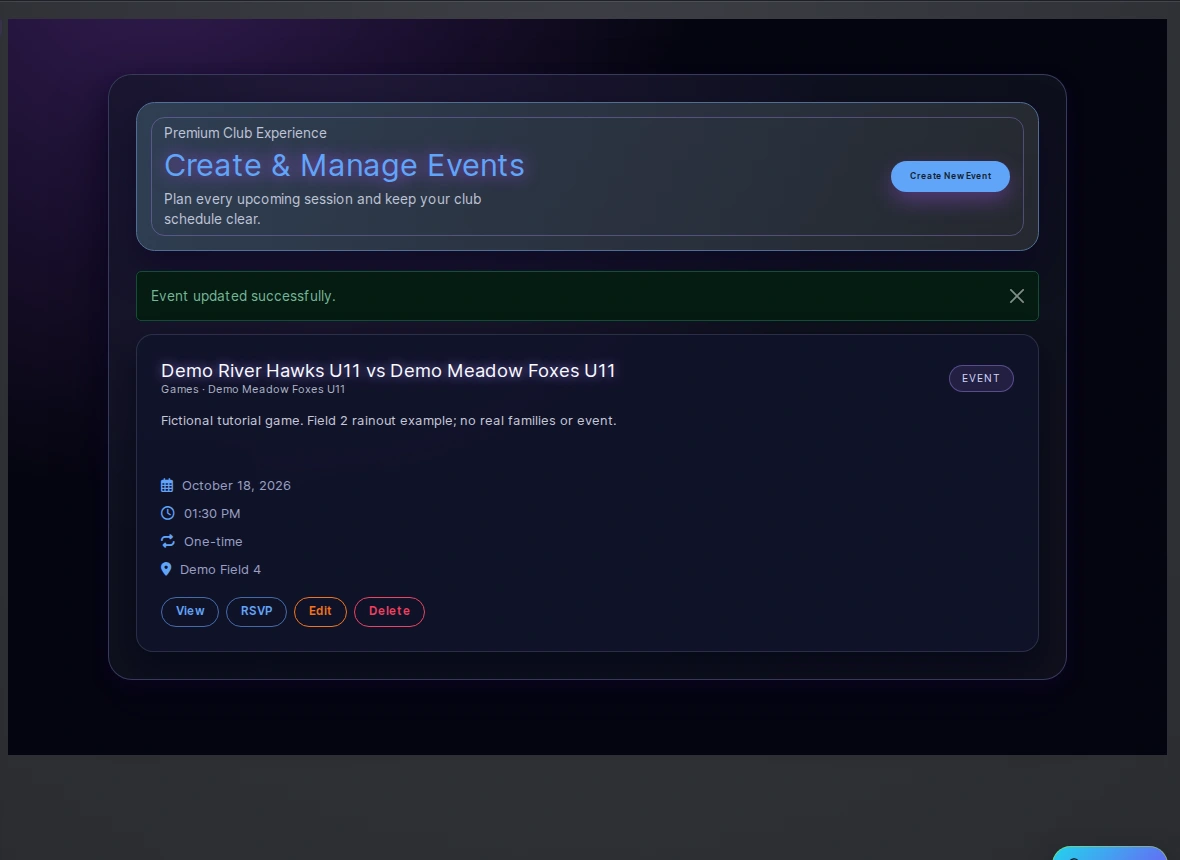
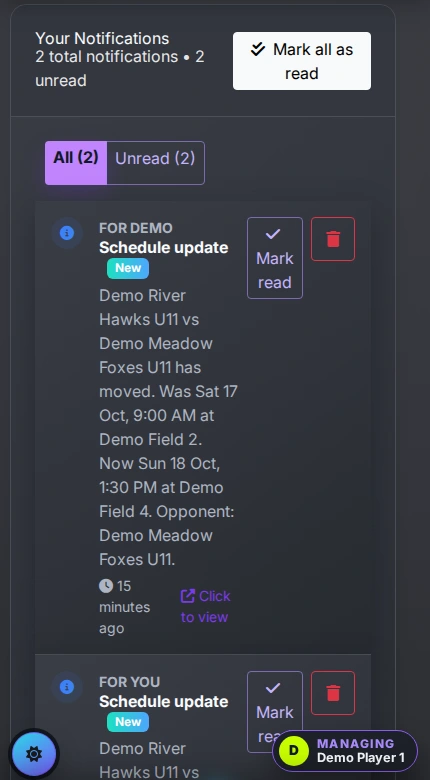

See a schedule change and its notice in a demo.
When a parent says “nobody told us”

Frequently asked questions
Update and verify the game in one official schedule, then send a notice with the old and new time and place through routes your club has tested for that event. Ask for an RSVP, review who answered and follow up with families who have not replied. Confirm any app, email or push route before assuming it worked.
Sometimes the update went to a channel that family did not check, or an older copy of the schedule was still visible. Check the event, the intended recipients and the routes actually used. Use one official schedule, a clear notice and a reply-and-follow-up routine.
Keep them for conversation if families like them. Stop using them to announce changes. A chat group is a poor record: messages scroll away, new families are not in it and nobody can tell who has seen what.
Follow the facility and safety decision first. Have the named owner update and verify the official game record, send a clear notice through confirmed routes to affected people, and ask coaches to follow up with families who have not replied.
Link each child to the parent or guardian accounts that need schedule access, then check that each can view the team event and that the intended notice route is enabled. Ask for a reply and follow up when there is none; linking an account does not guarantee delivery or reading.
Starter is free for clubs with up to 10 teams. Pro is $49.67 USD a month for 11 to 25 teams. Unlimited is $99.67 USD a month for 26 or more teams. Every feature is on every plan, and players and parents are always included. See pricing.
Related guides
- Parent communication guides: every parent communication guide in one place.
- Sports club management software — rosters, RSVPs, attendance and team chat in one place.
- Sports league scheduling software — build the season and keep it true when games move.
- How to choose youth sports management software — the questions to ask every provider.
- Import your existing schedule
- Pricing
