
In this guide
The question league organizers ask: "We have a U8 division of twelve teams, a U12 division of seven and a U16 division of five, and they all play on the same two venues on Saturdays. Every year the little ones run late, the older teams wait, and someone ends up double-booked. How do I schedule several divisions on shared fields?"
Why shared venues go wrong
- One slot grid for every age. A 90-minute game in a 60-minute grid eats the next game's start.
- No changeover time. Teams, nets, goals or boards need minutes to change, and nobody planned them.
- No rule for prime times. Whoever builds first takes the best slots, and the other divisions argue for the rest of the season.
- Conflicts checked by eye. A shared venue is exactly where a double booking hides.
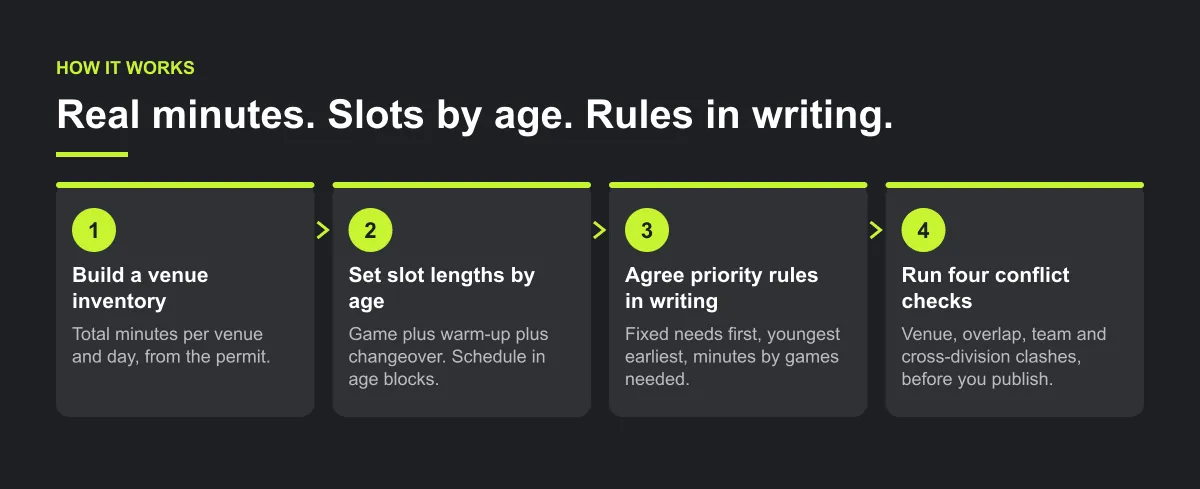
Step 1 — build a venue inventory
List every venue you hold, one line per venue per day:
- Venue and surface. For example: Field 2 full size, Field 2 split into two small-sided fields, Rink A, Court 3.
- Start and end time you actually hold, from the permit or booking, not from memory.
- What it can host. Which age groups fit on it, and whether it can be split.
- Lights, curfews and set-up rules that limit early or late games.
Add up the total minutes for each venue and day. That number, not the count of "slots", is what your divisions share.

Step 2 — set slot lengths by age
Each division needs its own slot length: game time plus warm-up plus changeover. Write them down as a short table. The numbers below are an illustrative example, not a rule. Use your own governing body's game lengths.
| Division | Game | Warm-up and changeover | Slot |
|---|---|---|---|
| U8 | 40 min | 20 min | 60 min |
| U12 | 60 min | 15 min | 75 min |
| U16 | 80 min | 10 min | 90 min |
Then build each venue's day in blocks: for example, U8 games on the split field from 8:00, U12 from noon, U16 in the late afternoon. Blocks by age keep slot lengths from colliding, and families with two children in nearby age groups may be able to stay at one venue.
Step 3 — agree priority rules in writing
Before you place a game, agree who gets what and publish it to the clubs:
- Fixed needs first. Venues only one division can use (a full-size field, a regulation rink) go to that division first.
- Youngest earliest, oldest latest, where your venue hours and age rules allow.
- Biggest division gets the most minutes, in proportion to the games it needs, not the number of teams.
- Rotate the bad times. If one division must take the first or last slot, rotate it between teams across the season.
- One person settles disputes, using the written rules.

Step 4 — run four conflict checks
Venue double-booking.
No field, rink or court, or part of a split field, has two games at once.
Overlap from slot length.
Every game ends, with changeover, before the next one starts on that venue.
Team double-booking.
No team plays two games at once.
People in two divisions.
Coaches, referees and families with players in two divisions: check the ones you know about by hand.
Illustrative example, not a specific league.
Suppose 90-minute U16 slots are squeezed into a 60-minute grid on a shared field. Later games may be pushed back. Set each age group's actual game, warm-up and changeover minutes first. If the games will not fit inside the permitted hours, add field time or reduce the schedule before publishing.
Worked example — two divisions on two fields
Illustrative example, not a specific league.
A league runs an under-10 division of 8 teams (60-minute slots) and an under-14 division of 6 teams (90-minute slots). Both play on the same 2 fields, which the league holds from 9:00 to 13:30 on Saturdays. The same method works for two rinks, courts or diamonds.
Step 1: what each division needs per round.
| Division | Teams | Games per round | Slot | Minutes per round |
|---|---|---|---|---|
| U10 | 8 | 4 | 60 min | 240 |
| U14 | 6 | 3 | 90 min | 270 |
| Total | 14 | 7 | 510 |
Step 2: what the league holds. 2 fields × 270 minutes (9:00 to 13:30) = 540 minutes. 540 − 510 leaves 30 minutes spare.
Step 3: split by need, not by team count. The U10s have 8 of the 14 teams, so splitting by team count would give them about 309 minutes and the U14s about 231. At 90 minutes a game, 231 minutes fits only 2 of the 3 U14 games. Splitting by games needed gives U10 240 minutes and U14 270, and every game fits.
Step 4: the Saturday grid.
| Time | Field 1 (U10, 60 min) | Field 2 (U14, 90 min) |
|---|---|---|
| 9:00 | U10 game 1 (to 10:00) | U14 game 1 (to 10:30) |
| 10:00 | U10 game 2 (to 11:00) | |
| 10:30 | U14 game 2 (to 12:00) | |
| 11:00 | U10 game 3 (to 12:00) | |
| 12:00 | U10 game 4 (to 13:00) | U14 game 3 (to 13:30) |
| 13:00 | 30 min free |
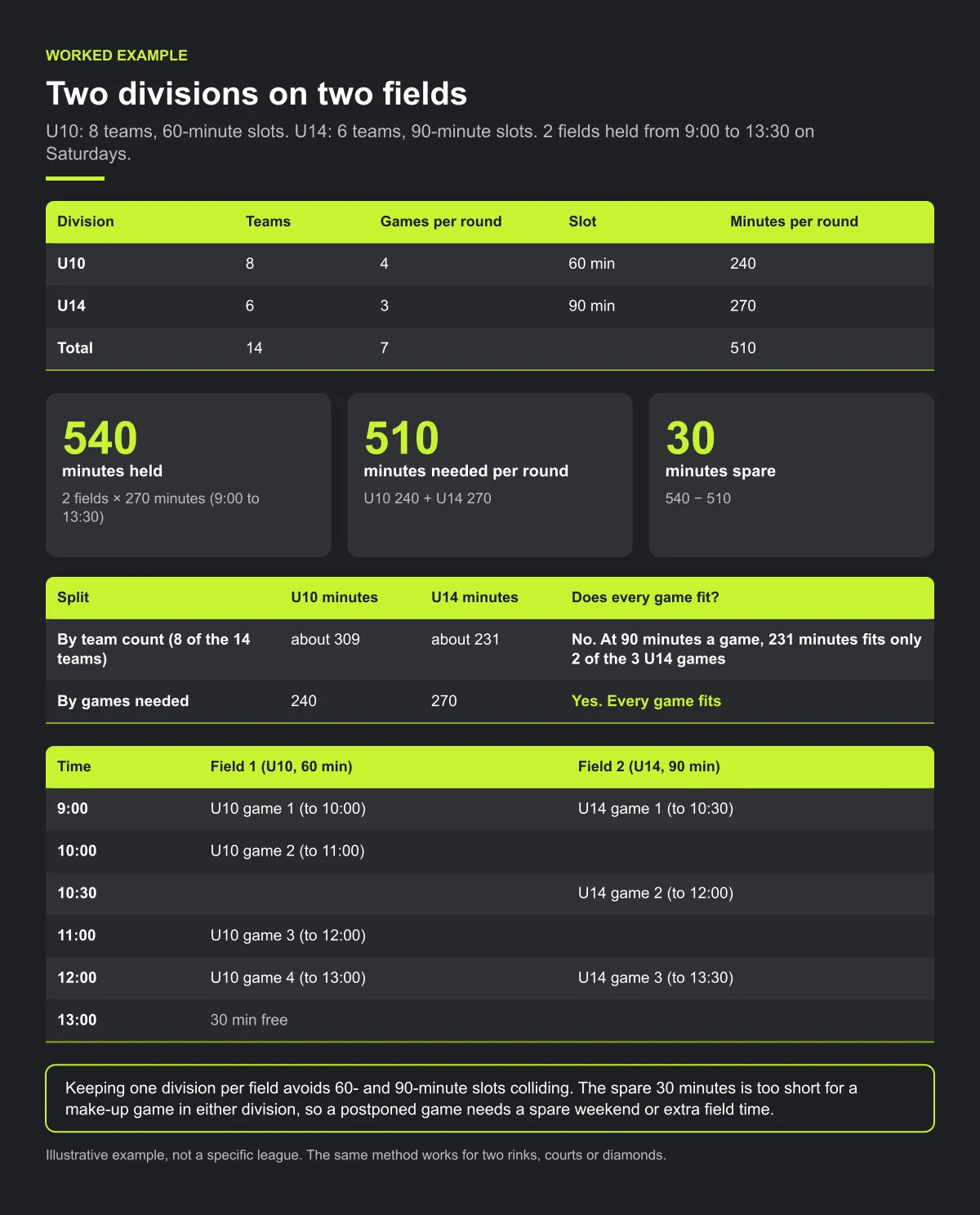
Keeping one division per field avoids 60- and 90-minute slots colliding. Notice the spare 30 minutes is too short for a make-up game in either division, so a postponed game needs a spare weekend or extra field time. Plan that before the season, not after the first rainout.
Checklist: shared venues
- Venue inventory in minutes, from the permit, per venue and day.
- Slot length per age group: game plus warm-up plus changeover.
- Minutes needed per round, per division, added up and compared with minutes held.
- Minutes shared by games needed, not by team count.
- Age blocks so different slot lengths don't share a field at the same time.
- Written priority rules sent to clubs before the build.
- Make-up capacity: a spare weekend or slot long enough for the longest game.
Common mistakes
- Splitting venue time by number of teams. A smaller division with longer games can need more minutes.
- Counting free minutes as make-up space. Leftover time only helps if it is at least one full slot for that age group.
- Mixing slot lengths on one field without a buffer. One long game pushes every later start on that field.
- Checking cross-division people last. A coach or referee in two divisions is easier to protect before games are placed.
How Play 2 Earn Sports supports this
- Divisions in one league. Each division is scheduled within the same league, with round robin pairings, home and away balance and team availability.
- Venue-conflict checks. The system flags field and team double-bookings, while your league checks priority rules by hand.
- A published schedule is not regenerated over. Changes you make after publishing are not wiped out by running the schedule again.
- Change notices. When the league approves a club's request, the clubs and the referee are told. Tell everyone else in the game yourself.
- One connected schedule. Families see their own child's games, and a parent with children in two divisions can switch between their linked children.
Priority rules and fair rotation of early and late times stay with your league: write them down and apply them when you review the draft.
See several divisions scheduled on shared venues, with conflicts flagged.
Frequently asked questions
Build a venue inventory in real minutes, set a slot length for each age group, schedule in age blocks, agree written priority rules with the clubs, and check for venue, overlap, team and cross-division conflicts before publishing.
Game time plus warm-up plus changeover, set by age. Use your governing body's game lengths for your sport and add the minutes your venue needs to change teams and equipment.
Agree it in writing before the build. One approach: fixed needs first, youngest earliest, minutes in proportion to games needed, and rotate the least wanted times between teams.
Yes, if your rules and the venue allow it. List each half or section as its own venue in your inventory so it can be checked for double-bookings like any other.
It balances home and away and flags field and team double-bookings. Sharing early and late times fairly is a rule your league applies when it reviews the draft.
Starter is free for clubs with up to 10 teams. Pro is $49.67 USD a month for 11 to 25 teams. Unlimited is $99.67 USD a month for 26 or more teams. For leagues, Starter is free for up to 10 clubs, League Pro is $97.85 USD a month for 11 to 25 clubs, and League Unlimited is $196.35 USD a month for 26 or more clubs. Every feature is on every plan, and players and parents are always included. See pricing.
Related guides
- League scheduling guides: every league scheduling guide in one place.
- Rainout and field closure process
- Parents keep missing schedule changes
- Sports league scheduling software
- League schedule maker
- Pricing
