

In this guide
- Why team registration turns into email chasing
- What it costs
- Step 1 — Set a registration window with dates that don't move
- Step 2 — Define what each team must submit
- Step 3 — Track it on one checklist
- Step 4 — Write the late-entry policy before anyone is late
- Worked example — a registration timeline for a September start
- Step 5 — Keep fees on your existing methods
- How Play 2 Earn Sports supports this
- Frequently asked questions
- Related guides
The question league organizers ask: "Every season I spend three weeks emailing clubs. Who's entering? How many teams? Which division? Where's the roster? And the schedule can't start until I know."
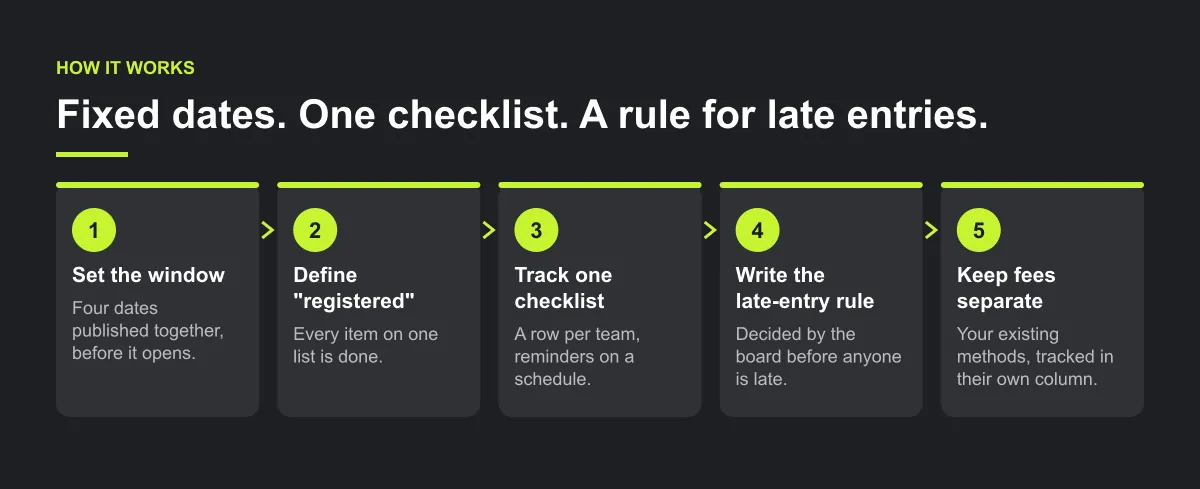
Why team registration turns into email chasing
- The deadline is soft. If last season's "deadline" moved twice, clubs learn that it will move again.
- Nobody knows what "registered" means. A team name in an email? A roster? A paid fee? Each club sends something different.
- Information arrives in pieces. Division in one email, coach contact in another, venue times in a third.
- Late entries are decided one by one. Every exception becomes a negotiation, and the next club expects the same.
What it costs
- The schedule starts late, because you can't build divisions until you know who's in.
- Divisions get rebuilt when a late team arrives after the schedule is drafted.
- Volunteer hours spent in inboxes instead of on the season.
- Friction with clubs, when one club sees another get a deal it didn't.
Illustrative example, not a specific club.
Here is an example. A league opens team entries "in the spring" with no fixed close. Two weeks after the planned schedule date, a club asks to add a second team in the same age group. The division goes from seven teams to eight, and the draft schedule has to be redone. Nobody did anything wrong. The rules were just never written.
Step 1 — Set a registration window with dates that don't move
Publish four dates together, before the window opens:
| Date | What happens |
|---|---|
| Opens | Clubs can enter teams |
| Closes (the deadline) | Team entries close; late-entry policy applies after this |
| Rosters and details due | Each entered team completes its checklist |
| Schedule published | The league builds and publishes the season |
Leave a real gap between "closes" and "schedule published". That gap is what lets you build divisions once.
Step 2 — Define what each team must submit
"Registered" means every item on this list is done. Publish it with the dates, so every club sends the same things:
Checklist: a registered team
- Club and team name, and the age group or division requested.
- Head coach and a second adult, with contact details.
- One club contact for league business, and a backup.
- Home field, rink, court or diamond and its available times, if your league uses home venues.
- Dates the team can't play, if your league accepts them, by the same deadline.
- Roster, by the roster date, in the league's format.
- Coach screening or certification your governing body requires.
- Fee paid by the league's usual method (tracked separately from "registered").
Step 3 — Track it on one checklist
Keep one tracker with a row per team and a column per item. Status is simple: done, missing, or not needed. Then send reminders on a schedule, not when you remember: for example, 14 days, 7 days and 2 days before the deadline, from the league office to the club contact only. Name exactly what's missing. "Your U12 team still needs a second adult and a roster" tells the club what to send. "Please complete registration" doesn't.

Step 4 — Write the late-entry policy before anyone is late
A late-entry policy is a league decision, not a software setting. Decide it at the board level, publish it with the dates, and apply it the same way to every club. Choices a league can make:
- Before the schedule is built: late entries accepted, with a late fee if your league uses one.
- After the schedule is built: late teams join only if a division has a gap (for example, a bye that can become a game), or wait for next season.
- Who decides: one named person or the board, not whoever answers the email.

Worked example — a registration timeline for a September start
Illustrative example, not a specific league.
A league's first games are on Saturday 12 September 2026. It works backwards and publishes every date on 1 June, when the window opens:
| Date | Days before first game | What happens |
|---|---|---|
| Mon 1 Jun | 103 | Window opens; dates, team checklist and late-entry policy published |
| Wed 17 Jun | 87 | Reminder 1 (14 days before close), naming each team's missing items |
| Wed 24 Jun | 80 | Reminder 2 (7 days before close) |
| Mon 29 Jun | 75 | Reminder 3 (2 days before close) |
| Wed 1 Jul | 73 | Entries close. Late-entry policy applies from now |
| Wed 15 Jul | 59 | Last day for late entries, with the late fee; after this, only into a division gap |
| Fri 31 Jul | 43 | Rosters and details due |
| Mon 10 Aug | 33 | Divisions confirmed; draft schedule sent to clubs for a 48-hour review |
| Wed 12 Aug | 31 | Club review closes |
| Mon 17 Aug | 26 | Schedule published |
| Sat 12 Sep | 0 | First games |
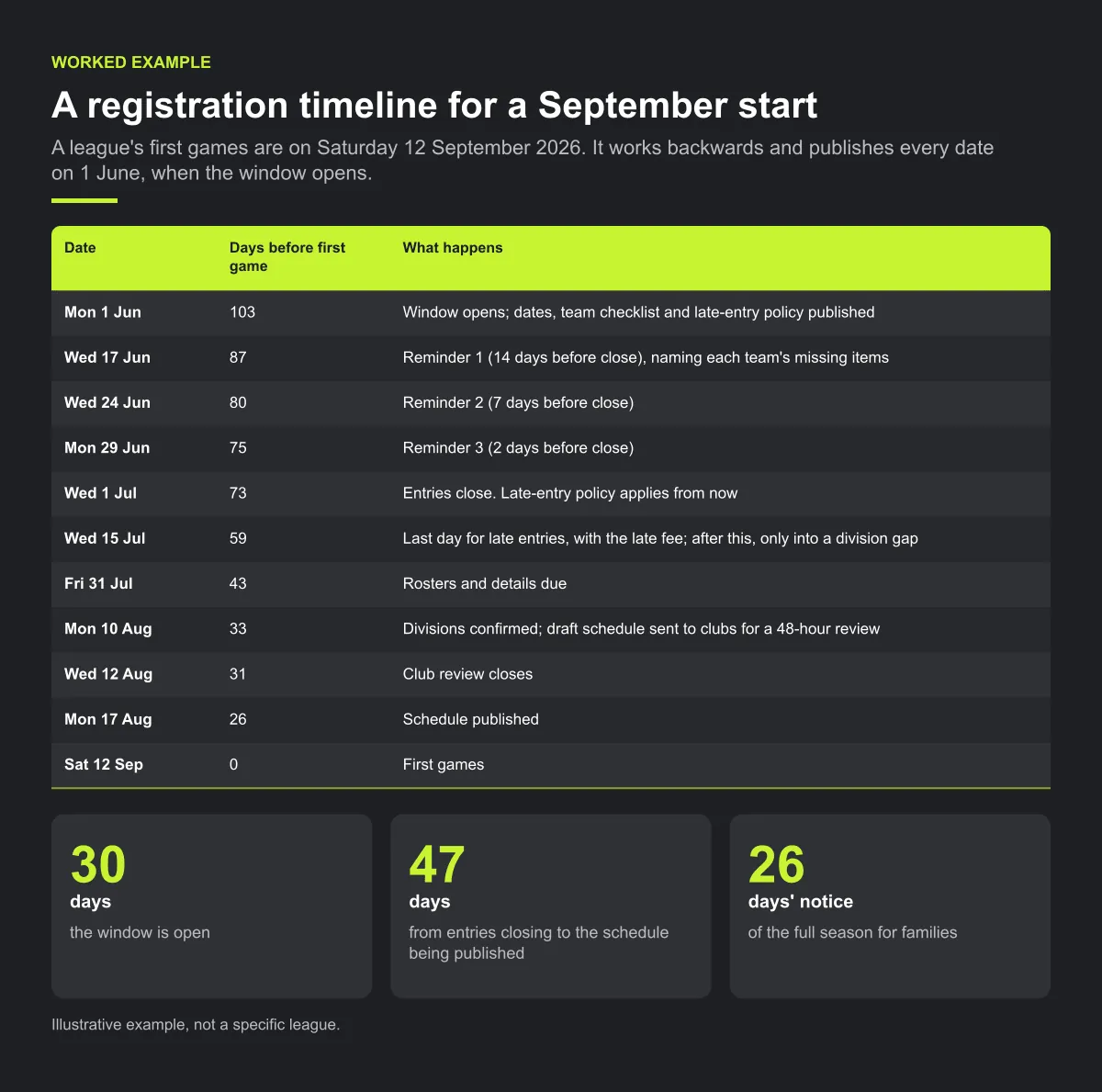
The gaps are the point. The window is open for 30 days. Entries close 47 days before the schedule is published, so divisions are built once, from a known list of teams. Late entries get two weeks with a fee, and still arrive before any division is drafted. Families get 26 days' notice of the full season.
What changes if a club asks on 20 July to add a team? The answer is already published: after 15 July, the team joins only if a division has a gap, such as a seven-team division where the bye can become a game. In a seven-team division, the eighth team fills the bye slot every round, so the draft has to change, but it hasn't been built yet. One rule, applied to every club, decides it.
Common mistakes
- Moving the deadline once. Clubs remember it and plan for it to move again.
- Counting a team as registered when only the name has arrived. Use the full checklist.
- Sending one reminder to everyone. A reminder that names each team's missing items is easier to act on.
- Leaving no gap between close and schedule. Divisions then get rebuilt as late information arrives.
Step 5 — Keep fees on your existing methods
Collect team fees the way your league already does: invoices to clubs, bank transfer, cheque, or whatever your treasurer uses. Track "fee received" as its own column, separate from "registered". A team can be complete on paper and still owe; that's a treasurer conversation, not a scheduling one.
How Play 2 Earn Sports supports this
- League team registration with a deadline. Teams register for the league season, and the league sets a team-registration deadline.
- Teams roll up to clubs. Each registered team belongs to its club.
- From entries to a schedule. Once teams are in, league auto-scheduling builds the season with round robin, divisions, home/away balance, team availability and venue-conflict checks.
- Rosters without re-typing. Roster CSV import helps clubs bring player lists in.
What stays with your league: Play 2 Earn Sports does not collect fees. Your league collects team fees by its existing methods. Late entries, waitlists and exceptions follow your written league policy; they are not automated.
See league team registration and scheduling in a demo league.
Frequently asked questions
They open a registration window with fixed dates, publish exactly what each team must submit, track it on one checklist, and apply a written late-entry policy the same way to every club.
Early enough to leave a real gap before the schedule is published. You need time to confirm divisions and build the season once.
Club and team name, division, head coach and a second adult, one club contact, venue and availability where relevant, a roster by the roster date, required coach screening, and the fee.
That's a league decision. One approach is to accept them before the schedule is built and only into a gap afterwards. Write the rule down and apply it to every club the same way.
By the league's existing methods, such as invoices to clubs. Track the fee separately from registration so you can schedule complete teams while the treasurer follows up.
Starter is free for clubs with up to 10 teams. Pro is $49.67 USD a month for 11 to 25 teams. Unlimited is $99.67 USD a month for 26 or more teams. For leagues, Starter is free for up to 10 clubs, League Pro is $97.85 USD a month for 11 to 25 clubs, and League Unlimited is $196.35 USD a month for 26 or more clubs. Every feature is on every plan, and players and parents are always included. See pricing.
Related guides
- League scheduling guides: every league scheduling guide in one place.
- League scheduling software
- League schedule maker
- Round robin generator
- Club fee reminders that aren't awkward
- Club communication standards
- Pricing
