
In this guide
- Why it goes wrong
- What it costs
- Step 1 — The league owns the official schedule and results
- Step 2 — What clubs must use, and what they may keep
- Step 3 — Calendar feeds, not re-typing
- Step 4 — A league communication standard
- Worked example — one moved game, two ways to pass it on
- Step 5 — A transition plan that doesn't force anyone
- How Play 2 Earn Sports supports this
- Frequently asked questions
- Related guides
The question league organizers ask: "We have twelve clubs and about six different apps. Every time we move a game, somebody finds out late. Which version of the schedule is the real one?"
Why it goes wrong
- Every club re-types the schedule. Each copy drifts a little: a time typed wrong, a field left out, a game moved in one app but not the others.
- Changes travel by forwarding. The league emails a club contact, who posts in a group chat, who tells a coach. Somewhere in that chain, the referee and the visiting team are missed.
- Nobody knows which version is official. When two copies disagree, people argue about the schedule instead of fixing the game.
- Results come in five different ways. A photo of a scoresheet, a text, a comment in a chat. Standings wait for someone to collect them.
What it costs
- Teams at the wrong field or the wrong time, and a forfeit argument afterwards.
- Referees who don't show, because their copy was out of date.
- Disputed standings late in the season, when they matter most.
- Volunteer hours spent re-typing and double-checking, every week.
Illustrative example, not a specific club.
Here is an example. A Saturday game moves from 9:00 to 11:00 because the rink, court or field was double-booked. The league emails both club contacts. The home club updates its app. The visiting club's contact is away for the weekend. Their team arrives at 9:00 to an empty venue, and the referee, who was never told, arrives at 9:00 too.

Step 1 — The league owns the official schedule and results
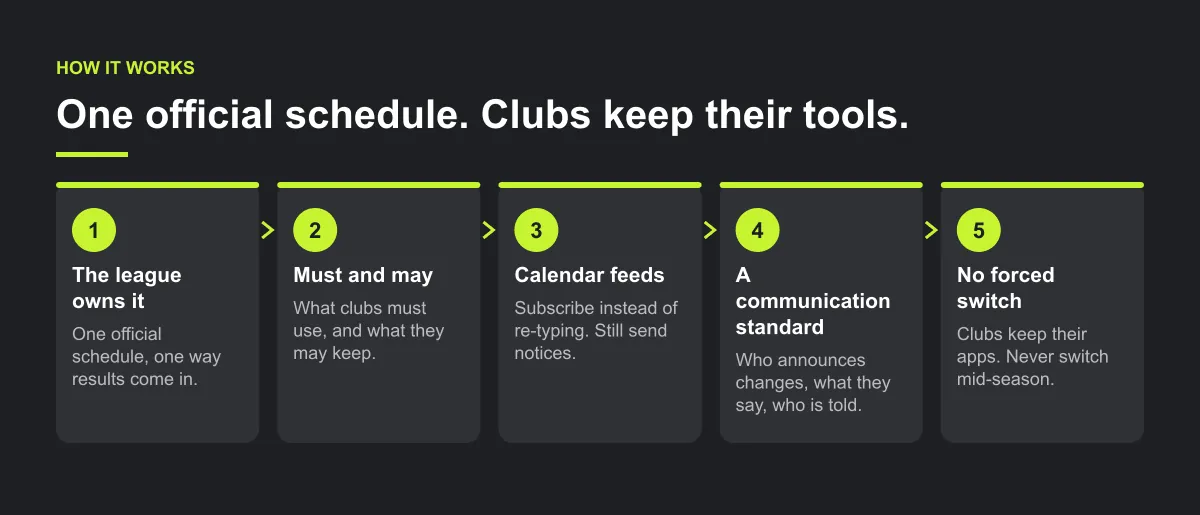
Write one sentence into your league rules: "The league schedule is the official schedule. If any copy disagrees with it, the league schedule wins."
Then make that true in practice:
- One published place for the schedule, with the date it was last changed.
- One person (or office) who can change it. Clubs request changes; they don't make them.
- One way results are reported, and one place standings are published.
Step 2 — What clubs must use, and what they may keep
| Clubs must | Clubs may keep |
|---|---|
| Treat the league schedule as the source for league games | Their own team app for practices and team chat |
| Name one league contact (and a backup) | Their own registration and club fees |
| Send schedule change requests to the league office | Their own club announcements |
| Report results the league's way, by the league's deadline | Their own uniforms, photos and club website |
| Pass league change notices to their teams the same day | Whatever internal tools they like |
This list lets the league run without forcing anyone to switch. Clubs keep their tools. The league keeps one truth.
Step 3 — Calendar feeds, not re-typing
If your schedule tool can publish a calendar link, clubs and families can subscribe to it instead of copying games by hand. A few rules make feeds work:
- One feed per team or division, so people subscribe to what they need.
- Feeds are one-way. Changes flow from the league to subscribers. Nobody edits back.
- A feed is not a notice. Calendar apps can refresh subscribed calendars on their own timing, so a change can take a while to appear. Always send a change notice as well.
If your tool can't publish a feed, publish one dated schedule file with a version number ("Schedule v7, updated Thursday") and retire old copies.
Step 4 — A league communication standard
Put this on one page and send it to every club contact before the season:
- Schedule changes: announced by the league office only, within an agreed time (for example, the same day it's decided).
- What every change notice says: the game, the old time and venue, the new time and venue, and who to contact.
- Who must be told: both teams, the assigned referees and the venue contact.
- Results: reported by an agreed person (for example, the home team) within an agreed time (for example, 24 hours).
- One channel for official notices, separate from chat. Discussion happens in chat. Decisions come from the league.
Worked example — one moved game, two ways to pass it on
Illustrative example, not a specific league.
A Saturday basketball game moves from 9:00 to 11:00 on Court 2. Eight groups need to know: each club's league contact, each team's coach, each team's families, the referee and the gym contact. Here is how the change travels by forwarding, and under a written league standard:
| Who needs to know | Forwarding chain | Steps from the league | League standard | Steps from the league |
|---|---|---|---|---|
| Home club contact | Email from league | 1 | Notice from league | 1 |
| Home coach | Club contact posts in group chat | 2 | Club passes on the same day | 2 |
| Home families | Coach tells them | 3 | Club passes on the same day | 2 |
| Away club contact | Email from league (away this weekend) | 1, not read | Notice from league, plus backup contact | 1 |
| Away coach | Waits for the away contact | not reached | Club backup passes on | 2 |
| Away families | Waits for the coach | not reached | Club backup passes on | 2 |
| Referee | Nobody's job | not reached | Notice from league | 1 |
| Gym contact | Nobody's job | not reached | Notice from league | 1 |
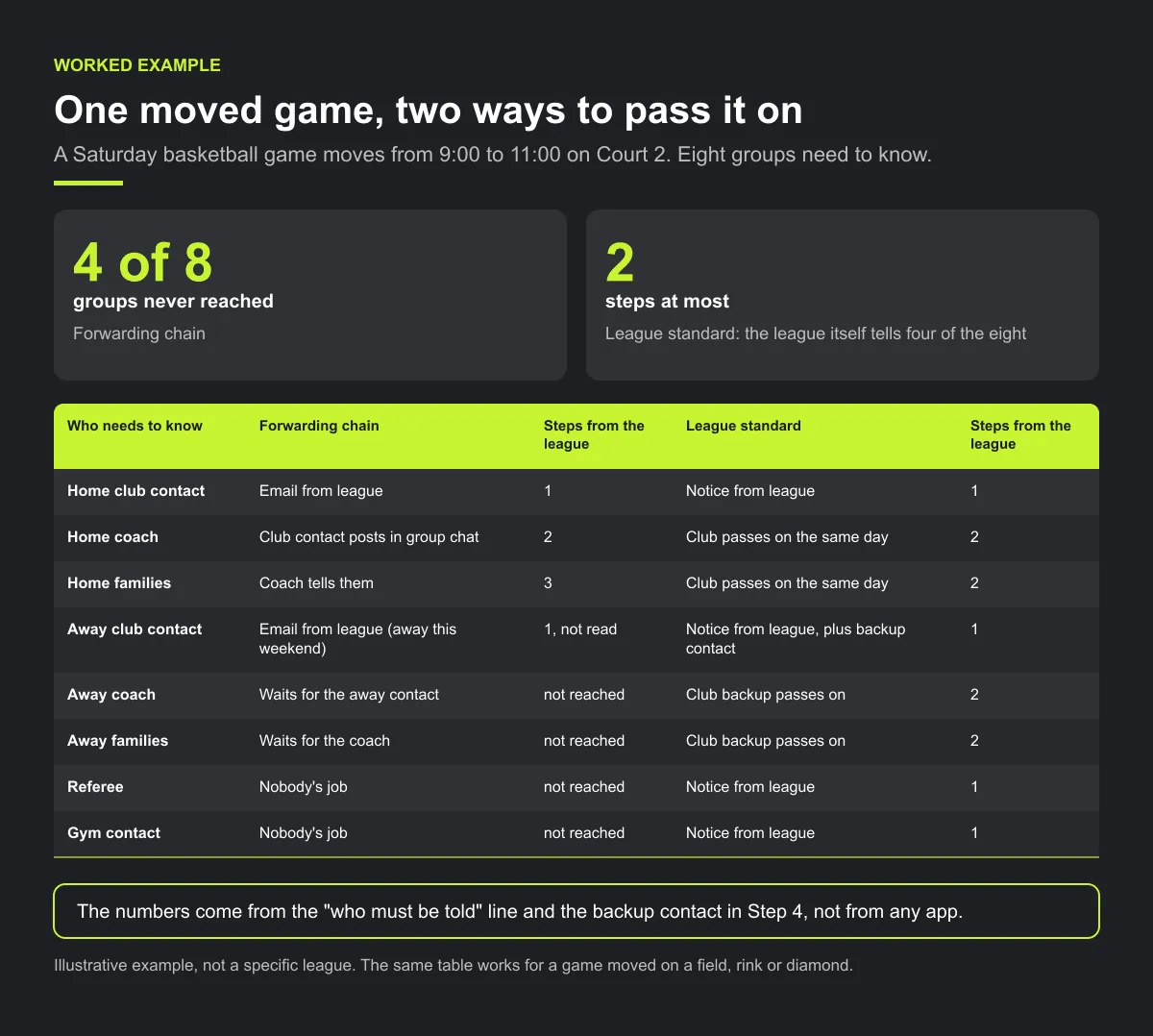
Under forwarding, 4 of the 8 groups are never reached, and the home families are three steps from the league. Under the standard, everyone is at most two steps away, the league itself tells four of the eight, and the backup contact covers the absent one. The numbers come from the "who must be told" line and the backup contact in Step 4, not from any app. The same table works for a game moved on a field, rink or diamond.
Step 5 — A transition plan that doesn't force anyone
Before the season:
publish the rules, the must/may list and the communication standard. Collect one contact per club.
First weeks:
the league office runs the official schedule. Clubs keep their apps and subscribe or copy from the league.
Mid-season check:
ask club contacts what went wrong. Fix the standard, not the clubs.
Next season:
offer clubs the option to run their teams in the league's tool. Never force a switch mid-season.
Checklist: one league, many apps
- "The league schedule is the official schedule" written into the rules.
- One person or office can change it; clubs request changes.
- Must/may list sent to every club.
- One league contact and a backup for every club.
- Calendar feed per team or division, or one dated, versioned file.
- Every change notice goes to both clubs, the referee and the venue.
- Results reported one way, by one deadline.
Common mistakes
- One contact per club with no backup. One person on holiday breaks the chain.
- Treating a calendar feed as the notice. A feed can update late; send the notice too.
- Letting clubs edit league games in their own apps. Their copy then disagrees with the official one.
- Forcing a switch mid-season. Offer the league's tool for next season instead.
How Play 2 Earn Sports supports this
- One league schedule. League auto-scheduling builds a season with round robin, divisions, home/away balance, team availability and venue-conflict checks that flag field and team double-bookings. A published or locked schedule is not regenerated over, so your reschedules stay put.
- Teams roll up to clubs. Each team in the league belongs to its club.
- Change notices. When the league approves a club's request, the clubs and the referee are told. Tell everyone else in the game yourself.
- Bring schedules in from a calendar link. Schedule import from a calendar link (one-way) and roster CSV import help a club or league get started. It is not a full migration from another app.
- Standings from confirmed results. Standings update as results are confirmed.
Those notices reach people who are on Play 2 Earn Sports. For everyone else, and for clubs that stay on another app, your league communication standard does the work.
See one league schedule, clash checks and standings in a demo league.
Frequently asked questions
No. The league needs one official schedule, one way to report results and one communication standard. Clubs can keep their own tools for practices, chat and club business.
The league's. Write it into the league rules: if any copy disagrees with the league schedule, the league schedule wins.
If the league's tool publishes a calendar link, clubs and families can subscribe to it. Feeds are one-way and can refresh slowly, so always send a change notice too.
The league office only. Clubs request changes; the league decides and announces them to both teams, the referees and the venue contact.
One way, by one agreed person, within an agreed time, for example the home team within 24 hours. Standings come only from results reported that way.
Starter is free for clubs with up to 10 teams. Pro is $49.67 USD a month for 11 to 25 teams. Unlimited is $99.67 USD a month for 26 or more teams. For leagues, Starter is free for up to 10 clubs, League Pro is $97.85 USD a month for 11 to 25 clubs, and League Unlimited is $196.35 USD a month for 26 or more clubs. Every feature is on every plan, and players and parents are always included. See pricing.
Related guides
- League scheduling guides: every league scheduling guide in one place.
- League scheduling software
- Import a schedule
- Referee scheduling software
- Club communication standards
- When parents miss schedule changes
- Pricing
