

In this guide
- An example: the Monday after
- Why it goes wrong
- What it costs
- Step 1 — club-owned team records from day one
- Step 2 — the coach handover checklist
- Step 3 — tell families quickly, from the club
- Step 4 — onboard the new coach
- Worked example — a completed handover sheet
- How Play 2 Earn Sports supports this
- Frequently asked questions
- Related guides
The question club leaders ask: "Our U12 coach quit mid-season and the group chat, the parents' numbers and all the team information left with them. We had to rebuild everything from scratch. What happens to team communication when a coach leaves, and how do we stop this happening again?"
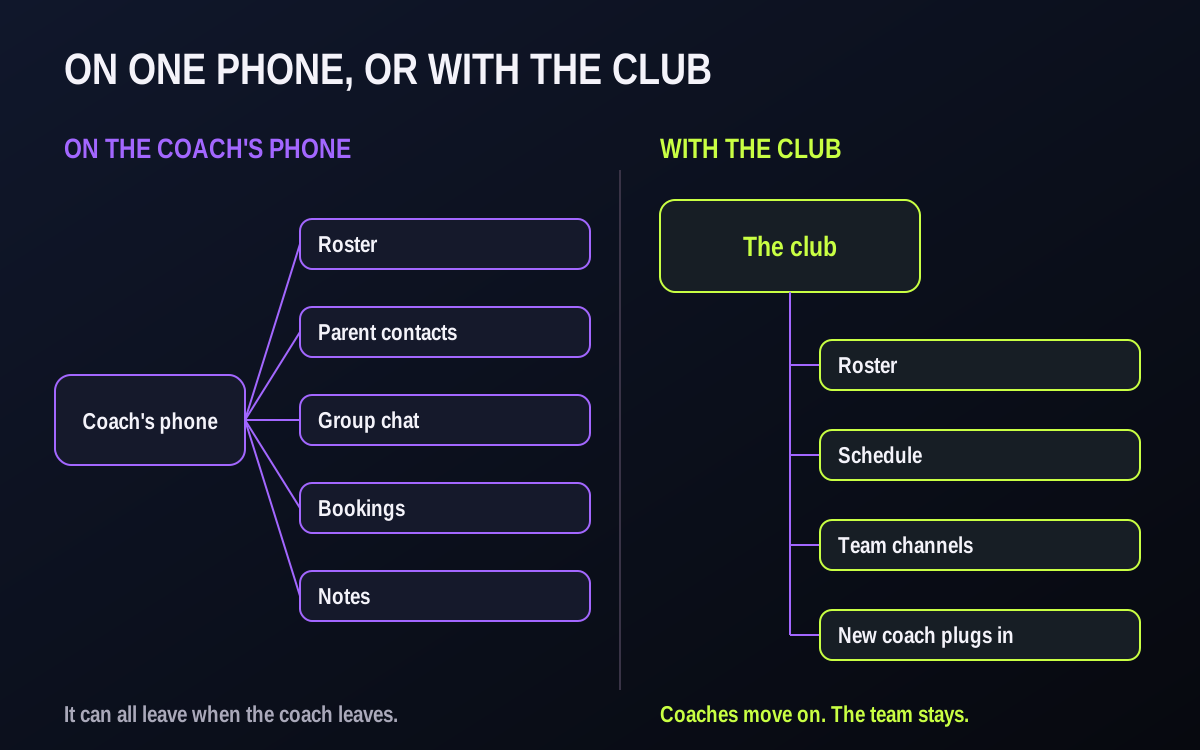
An example: the Monday after
Illustrative example, not a specific club.
Here is an example. A U12 volleyball coach steps down on a Sunday night after a job change. On Monday the club director starts to piece things together.
- The team's group chat was created by the coach, who was the only admin.
- Parents' phone numbers and emails are in the coach's contacts, not the club's records.
- One player's allergy note was in a text message.
- A tournament entry was booked on the coach's own email.
- The bag of game balls and the equipment room key are in the coach's car.
The coach wasn't careless. The club just never decided where team information should live.
Why it goes wrong
- The group chat belongs to the coach. They created it and are the only admin.
- Contacts live on a personal phone. The club has a registration list; the coach has the working one.
- Nothing is written down. Who has the equipment, what was promised, what is booked.
- Exits are sudden. A move, a new job, a falling out. There may be no time for a careful handover.
What it costs
- Families in the dark for days, some of whom may start looking at other clubs.
- Missing equipment, keys and bookings, and promises nobody else knew about.
- A new coach starting from zero, in the middle of a season, without knowing which players are injured, which parent drives the carpool or what the team was working on.
- A safeguarding gap. If a departing coach keeps a team group chat with young players in it, the club has a channel it cannot see and an adult who is no longer a coach still inside it.

Step 1 — club-owned team records from day one
- The roster and family contacts live in the club's system, collected at registration, not on a coach's phone.
- The schedule is the club's, so every game and practice is already there for the next coach.
- Team channels are the club's, so the club is never locked out.
- Outside group chats: if a team also uses one, the club creates it and a club admin is a co-admin from the start.
Step 2 — the coach handover checklist
Use it every time a coach leaves, even on good terms. Copy it into your coach pack as it stands.
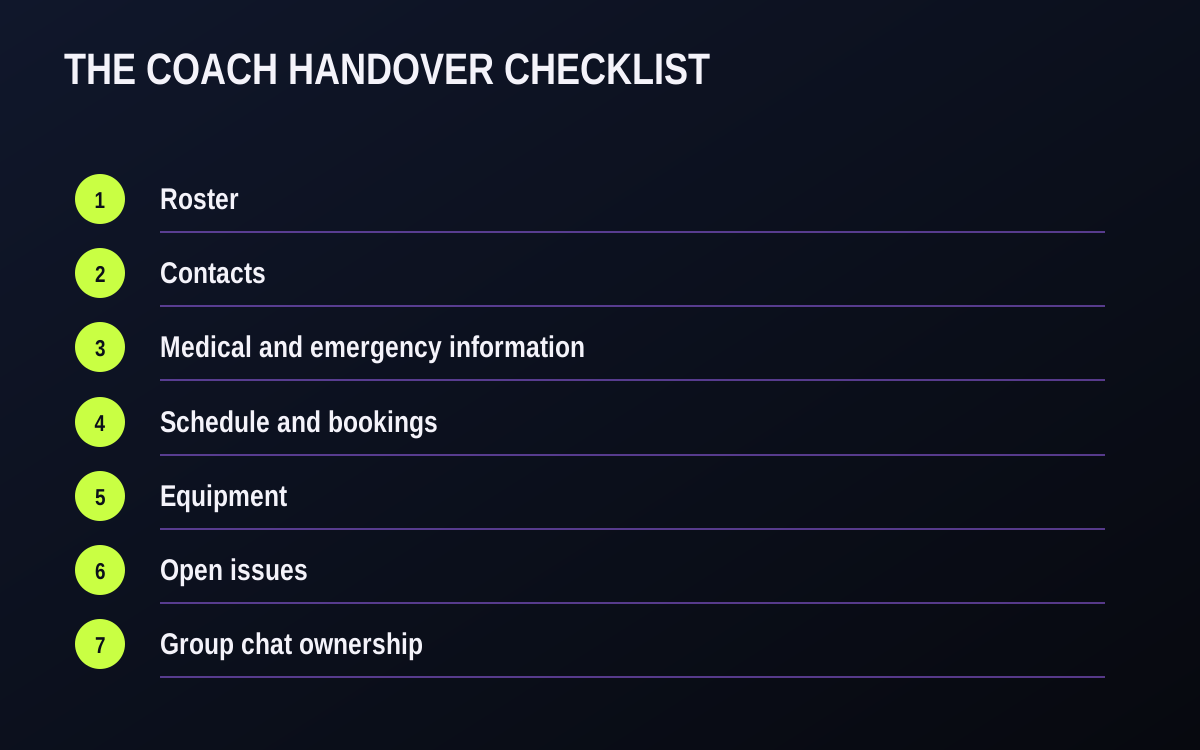
Checklist: coach handover
- Roster. Confirm it's current in the club's records: players, positions where you track them, guardians.
- Contacts. Any parent contact the coach collected outside the club goes to the club office, then the coach deletes their copies.
- Medical and emergency information. Handled under your club's privacy policy and local law. The club should already hold it from registration. The coach returns or deletes any copies on paper or on their phone, and the club notes that it was done.
- Schedule and bookings. Anything arranged outside the club's schedule: tournaments, extra field, rink or court time, exhibition games.
- Equipment. Uniforms, game equipment, first-aid kit, keys, and who has each.
- Open issues. Injuries, a family concern, a refund that was promised, a player who was told they'd move up.
- Group chat ownership. Admin rights move to a club admin before the coach leaves. The coach doesn't delete it or take it with them.
- Access. Once the handover is done, remove the departing coach from team channels, outside group chats and any club logins, and note the date.
Step 3 — tell families quickly, from the club
Within a day if you can. Say who is coaching now, or who is in charge until a coach is found, and what doesn't change. Keep it short and kind, and don't discuss why the coach left.
Hi [team] families, [coach] has stepped down as coach of [team]. We're grateful for their time with the team. Until a new coach starts, [name] is your contact at [email]. The schedule, the team and where you find information stay the same. We'll introduce the new coach as soon as they're confirmed.

Step 4 — onboard the new coach
- Hand them the checklist and the team's records and channels on day one.
- Share the club's communication standard, so families get the same experience as before.
- Introduce them to families in a club message.
- Check in after the first week, when the real questions show up.
Worked example — a completed handover sheet
Illustrative example, not a real club.
A U14 hockey coach tells the club on a Thursday that they are moving for work in nine days. The club director opens the handover checklist and turns it into a sheet with owners and dates. Here is what it looks like after the first conversation.
| Item | Status | Owner | By when |
|---|---|---|---|
| Roster and guardians checked against club records | Two guardians missing; added | Registrar | Friday |
| Parent contacts on coach's phone | Coach confirmed all are in club records; deleting copies | Coach | Day of leaving |
| Medical notes | One allergy note was in a text; now in club records under the privacy policy | Registrar | Friday |
| Extra ice time booked by the coach | Two Sunday sessions on coach's own account; moved to club account | Club scheduler | Monday |
| Tournament entry | Entered under coach's email; organizer asked to change contact | Club director | Monday |
| Equipment | Pucks, cones, first-aid kit and dressing-room key returned | Coach → equipment manager | Last practice |
| Open issues | One player recovering from a concussion; return-to-play note handed to the new coach | Coach → new coach | Handover meeting |
| Group chat | Club admin added as co-admin; coach removed after the handover | Club director | Day of leaving |
| Family message | Sent from the club with the interim contact | Club director | Friday |
| New coach day one | Records, channels, this sheet, communication standard | Club director | New coach's first day |
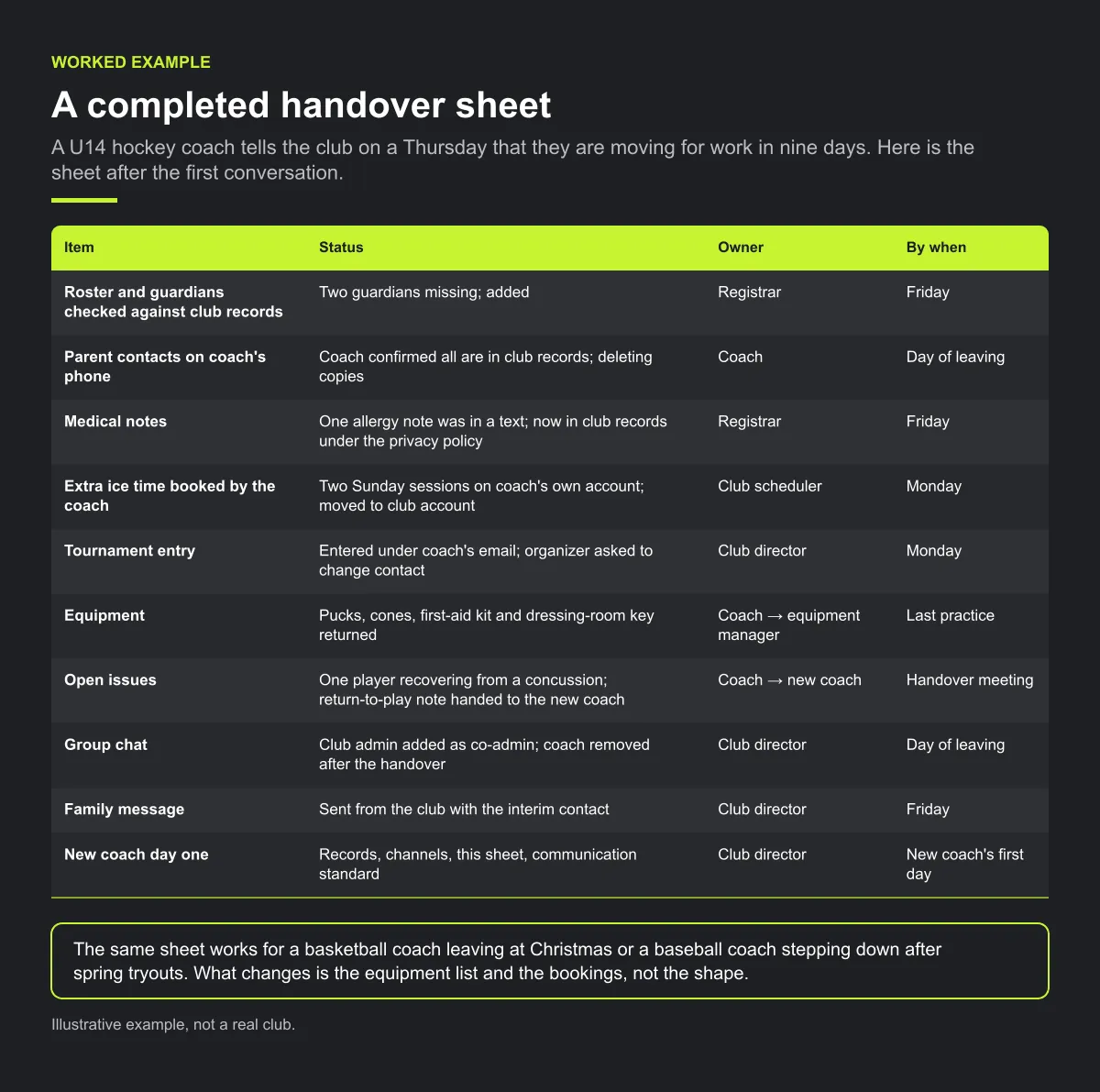
The same sheet works for a basketball coach leaving at Christmas or a baseball coach stepping down after spring tryouts. What changes is the equipment list and the bookings, not the shape.
Common mistakes
- Waiting for the "right time" to ask. If the coach is leaving, run the checklist while they are still reachable. A week later they may not answer.
- Explaining why the coach left. Families need to know who is in charge now, not the reason. Keep the message short and kind.
- Handing over the group chat by deleting it. Families lose their history and new families have nowhere to go. Move the admin role instead.
- Treating a mid-season replacement like a new season. The new coach needs the open issues list most of all: injuries, promises and family concerns.
How Play 2 Earn Sports supports this
- Rosters stay with the team. The roster belongs to the team, not the coach.
- Coaches can be reassigned. The club assigns the team to a new coach, and the roster, schedule and team channels are still there.
- Club owners and managers can review team channels, so the club is never locked out of a team's conversation. Private direct messages are not shown to the club.
- No personal numbers needed in team chat, with youth-safety guards, so families talk to the team through the club, not a coach's personal number.
- Nothing is copied from a coach's phone. Personal contacts and outside group chats don't transfer automatically. That's what the handover checklist is for.
See how team records stay with the club when coaches change.
Frequently asked questions
If the coach owned the group chat and the contacts, it can leave with them. If the club owns team records and channels, a new coach or manager picks up the roster, schedule and channels and carries on.
The club. If a team uses an outside group chat, a club admin should be a co-admin from the day it's created, and admin rights move to the club before a coach leaves.
Roster, contacts collected outside the club, medical and emergency information (per your privacy rules), schedule and bookings, equipment and keys, open issues, and group chat ownership.
Return or delete any copies, following the club's privacy policy and local law. The club should already hold this information from registration.
From the club, within a day, short and kind: who is in charge now, what doesn't change, and when the new coach will be introduced. Don't discuss the reasons.
Starter is free for clubs with up to 10 teams. Pro is $49.67 USD a month for 11 to 25 teams. Unlimited is $99.67 USD a month for 26 or more teams. Every feature is on every plan, and players and parents are always included. See pricing.
Related guides
- Parent communication guides: every parent communication guide in one place.
- Club communication standards
- Coaches getting late-night parent messages
- Parents keep missing schedule changes
- Sports club management software
- Pricing
