
In this guide
- Why blackout dates get missed
- Step 1 — split blackout dates into two lists
- Step 2 — one form, one deadline, before the build
- Step 3 — enter the dates before you build
- Step 4 — search the draft for every blackout date
- Step 5 — when a blackout arrives late
- Worked example — blackout dates and the weeks left
- How Play 2 Earn Sports supports this
- Frequently asked questions
- Related guides
The question league organizers ask: "Last season we scheduled games on a holiday Monday, on the weekend of the provincial tournament, and in the middle of one school's exam week. Every one of those dates was known months ahead. How do I add blackout dates to a league schedule so they don't get forgotten?"
Why blackout dates get missed
- They're collected too late. A club mentions its tournament weekend after the schedule is out.
- League-wide and team dates are mixed up. "No games on the long weekend" and "one team is away that weekend" need different handling.
- School calendars differ. A league that covers several school districts has several exam weeks and holiday dates.
- Nobody checks the draft. The date was on the list, but no one searched the schedule for it.
Step 1 — split blackout dates into two lists
League-wide no-game dates apply to every team:
- Public holidays and long weekends.
- League or association tournaments and showcase weekends.
- Dates the league office decides to keep clear, such as a make-up weekend.
Team, venue and field dates apply to one part of the league:
- A team at an outside tournament or on a trip.
- School events or exam weeks for one school or district.
- Venue closures, maintenance, and dates a venue is booked for something else.
- Religious and cultural observances that matter to a club's families.
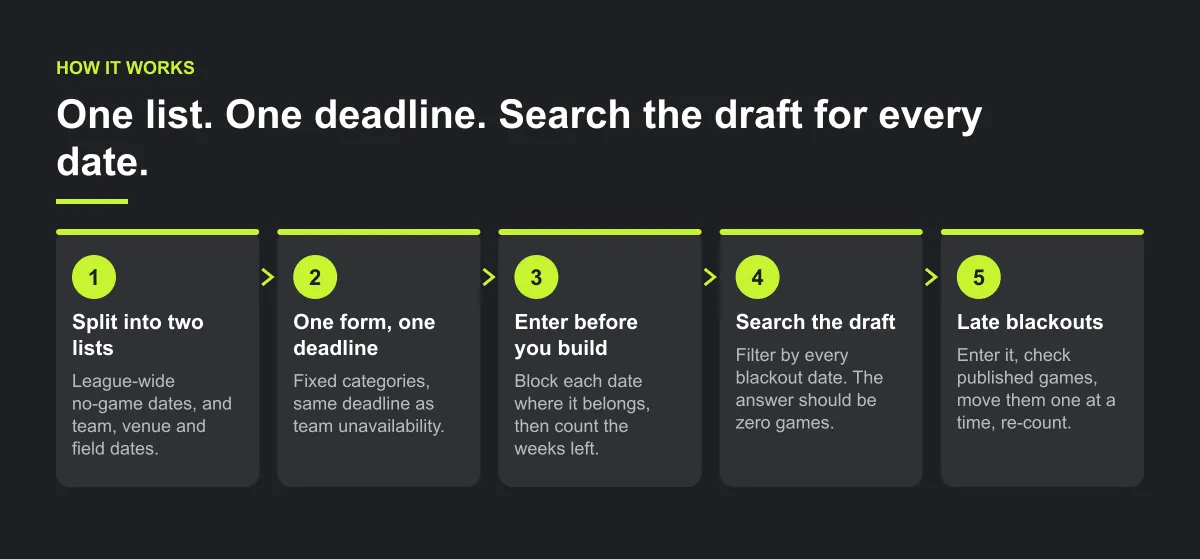
Step 2 — one form, one deadline, before the build
Ask every club for its team, venue and field dates on the same form and by the same deadline as team unavailability. Use fixed categories: holiday, closure, maintenance, tournament, team unavailable, other. Publish the league-wide list with the season dates so every club plans around it.
Dates that arrive after the deadline go in, but the club accepts that they may need a game moved rather than the schedule rebuilt.
Step 3 — enter the dates before you build
- League-wide dates: take them out of the season calendar you schedule into. If your tool can't block a date for the whole league, block every venue and field the league uses for that date.
- Team dates: block them on the team.
- Venue and field dates: block them on the venue or the field.
Then count what is left. Every league-wide date removes a whole round of capacity, so check that each division's rounds still fit in the weeks that remain before you place a single game (see the worked example below). Enter the reason with each block, such as "Holiday" or "Maintenance", so the next person who sees an empty weekend knows it is deliberate and doesn't fill it.
Step 4 — search the draft for every blackout date
Before anyone sees the draft:
- For each league-wide date, filter the schedule by that date. The answer should be zero games.
- For each team blackout, filter by that team and date range.
- For each venue or field closure, filter by that venue and date.
Illustrative example, not a specific league.
Here is an example. A league knows about a holiday Monday months ahead, but it's never entered anywhere. The draft puts six games on it, and the first parent to notice is the one who has booked a family trip. A thirty-second date filter before publishing would have caught all six.
Step 5 — when a blackout arrives late
- Enter it anyway, so no new game is placed in it.
- Check whether any published games already fall inside it.
- Move those games one at a time. Confirm the affected clubs and assigned referee have the new details, and ask each club to tell its families through its normal channel.
- Re-count the weeks left. A late league-wide date can use up your make-up weekend before the first rainout.
Worked example — blackout dates and the weeks left
Illustrative example, not a specific league.
A fall league plays on Saturdays from 12 September to 28 November 2026: 12 Saturdays. Before building, it removes its league-wide dates:
| Week | Saturday | Status |
|---|---|---|
| 1 | 12 Sep | Play |
| 2 | 19 Sep | Play |
| 3 | 26 Sep | Play |
| 4 | 3 Oct | Play |
| 5 | 10 Oct | No games: long weekend |
| 6 | 17 Oct | Play |
| 7 | 24 Oct | Play (U12 Team C away at an outside tournament) |
| 8 | 31 Oct | Play (Field 2 closed for maintenance) |
| 9 | 7 Nov | No games: association tournament |
| 10 | 14 Nov | Play |
| 11 | 21 Nov | Play |
| 12 | 28 Nov | Held clear: make-up weekend |
12 Saturdays − 3 league-wide dates = 9 playing Saturdays. Now compare each division's rounds with the weeks left:
| Division | Teams | Format | Rounds needed | Playing Saturdays | Spare |
|---|---|---|---|---|---|
| U12 | 7 | Single round robin | 7 | 9 | 2 |
| U14 | 8 | Single round robin | 7 | 9 | 2 |
| U16 | 6 | Double round robin | 10 | 9 | −1: doesn't fit |
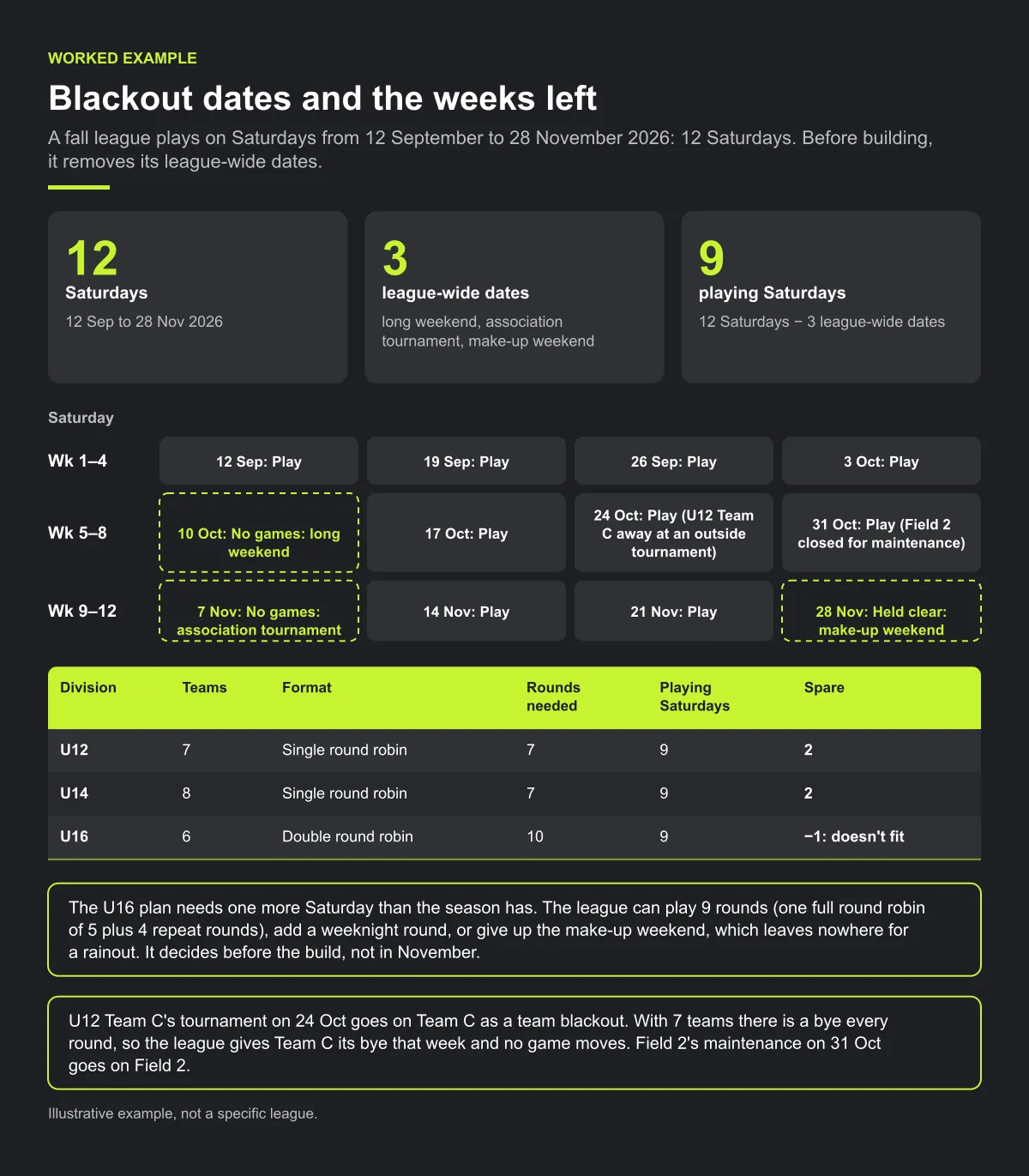
The U16 plan needs one more Saturday than the season has. The league can play 9 rounds (one full round robin of 5 plus 4 repeat rounds), add a weeknight round, or give up the make-up weekend, which leaves nowhere for a rainout. It decides before the build, not in November.
The two smaller dates are handled where they belong. U12 Team C's tournament on 24 Oct goes on Team C as a team blackout. With 7 teams there is a bye every round, so the league gives Team C its bye that week and no game moves. Field 2's maintenance on 31 Oct goes on Field 2, and the league checks that the other fields still have enough slots that day for every division's games.
Checklist: blackout dates
- One form, one deadline, fixed categories, same as team unavailability.
- League-wide dates separated from team, venue and field dates.
- Weeks left counted and compared with every division's rounds.
- Each team, venue and field date blocked where it belongs, with a reason.
- Draft filtered by every blackout date: zero games on each.
- Late blackouts entered, existing games checked, weeks re-counted.
Common mistakes
- Counting weeks before removing blackouts. The season looks long enough until the long weekend and the tournament weekend come out.
- Treating one team's trip as a league-wide date. That costs every other team a week. Block it on the team.
- Using the make-up weekend as a playing week. A plan that needs every Saturday has no room for weather.
- Skipping the date filter. A date that was on the list but never searched for is still a forgotten date.
How Play 2 Earn Sports supports this
- Team, venue and field blackouts. Clubs can block holidays, closures, tournament weekends and team-unavailable dates on their teams, venues and fields, in the "Holidays, closures & reservations" card on their league page. The league scheduler won't place games in those periods.
- Hard limits, not preferences. Blocked periods can't be used by the scheduler, and when a game is moved, team blackouts and field availability are checked again before it saves.
- League-wide dates are a club-by-club step. There is no single league-wide blackout list set by the league office. The league controls the allowed days and the earliest and latest times. For a league-wide date, ask every club to block its venues, then filter the draft by that date.
- Tell families after a move. Update the game first, then confirm the affected clubs and the assigned referee have the new details. Each club should tell its own families through its normal channel; do not assume every move sends an automatic parent notice.
Block the dates once, and keep them out of the draft.
Frequently asked questions
Split them into league-wide dates and team, venue or field dates. Collect them on one form by one deadline, enter them before you build, and filter the draft by every blackout date to confirm no games landed there.
Public holidays and long weekends, league or association tournaments, school exam weeks and events for the schools your families attend, venue closures and maintenance, and observances that matter to your clubs' families.
A league-wide blackout means no games for anyone. Team unavailability means one team can't play, so other teams still can.
Enter it so no new games are placed in it, check whether published games already fall in it, and move those one at a time. Confirm the affected clubs and assigned referee have the new details, then have each club tell its families.
Yes, on teams, venues and fields. Clubs block holidays, closures, tournament weekends and team-unavailable dates, and the scheduler won't place games in them. There is no single league-wide blackout list, so a league-wide date is blocked venue by venue.
Starter is free for clubs with up to 10 teams. Pro is $49.67 USD a month for 11 to 25 teams. Unlimited is $99.67 USD a month for 26 or more teams. For leagues, Starter is free for up to 10 clubs, League Pro is $97.85 USD a month for 11 to 25 clubs, and League Unlimited is $196.35 USD a month for 26 or more clubs. Every feature is on every plan, and players and parents are always included. See pricing.
Related guides
- League scheduling guides: every league scheduling guide in one place.
- Sports league scheduling software
- League schedule maker
- Rainout and field closure process
- Pricing
