

In this guide
- Why referee pay spreadsheets can break
- Step 1 — publish a fee schedule before the season
- Step 2 — one record per game, from assignment
- Step 3 — write the rules for the awkward cases
- Step 4 — pay on a fixed cycle and close the loop
- Step 5 — let officials see their own record
- Worked example — one official's September ledger
- How Play 2 Earn Sports supports this
- Frequently asked questions
- Related guides
The question league organizers ask: "Our referee pay lives on a spreadsheet one volunteer keeps. Referees email asking if they've been paid for the game three weeks ago, and nobody can answer quickly. How do leagues track what referees are owed?"
This guide uses "referee" for referees, umpires and officials in every sport. It covers tracking. The actual paying is done by your league or clubs, the way you already pay.
Why referee pay spreadsheets can break
- The fee isn't written down per game. Rates differ by age group and role, and the spreadsheet holds one number.
- Nobody knows who pays. The home club, the league, or both clubs split it? Each game is a negotiation.
- "Paid" means different things. Sent, received, partly paid, paid in cash at the field.
- The referee can't see it. Every question becomes an email to one volunteer.
- Schedule changes don't reach the ledger. A cancelled or moved game stays "owed" on the sheet.
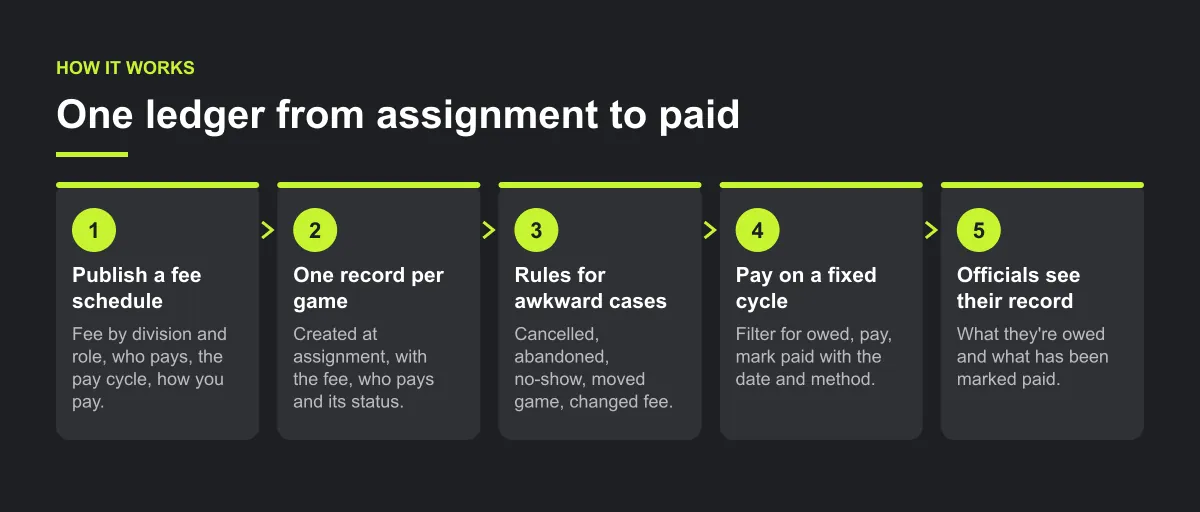
Step 1 — publish a fee schedule before the season
One table, shared with clubs and officials:
- Fee by age group or division and by role (for example, centre referee and assistant, plate and base umpire, lead and trail official).
- Who pays: the home club, the league, or a split between both clubs.
- The pay cycle: for example, every two weeks, or within a set number of days after the game.
- How you pay: e-transfer, cheque, or whatever your league already uses.
Step 2 — one record per game, from assignment
When a referee is assigned, the game gets a fee record:
| Field | Example |
|---|---|
| Game and date | U13 Division B, Saturday |
| Official and role | Assigned referee, centre |
| Fee | From the fee schedule |
| Who pays | Home club |
| Status | Owed |
| Paid date, method, note | Filled in when paid |
Keep the status to a short, fixed list: no fee set, owed, partly paid, paid.
Step 3 — write the rules for the awkward cases
- Game cancelled before kickoff: is a fee owed? It may not be, if the official was told in time. Write the cutoff down.
- Game abandoned after it starts (weather, injury, lightning): full fee, half fee? Decide once.
- Official no-show: no fee, and the record says so.
- Moved game, new official: the fee follows the official who worked it.
- Fee changed for one game (a tournament rate, a double-header): note the reason on that game.

Step 4 — pay on a fixed cycle and close the loop
- On each pay day, filter for owed, pay them, and mark each one paid with the date and method.
- Partly paid games stay visible until they are settled.
- Once a month, check totals: owed, paid, remaining, per official.
Illustrative example, not a specific league.
Here is an illustrative example. A league's referee spreadsheet shows one official as owed for eight games. The official says ten. Two games were moved to a new date and added to a second tab. With one record per game, created from the assignment, the moved games carry their fee with them.
Step 5 — let officials see their own record
Officials should be able to check what they're owed and what has been marked paid without emailing anyone. That gives each official a place to verify status before contacting the pay lead. Keep money tasks with a named person (such as a treasurer), with a backup, and keep anyone else to view-only access.
For tax and reporting rules where you are, ask your accountant. Leagues and clubs handle that themselves.

Worked example — one official's September ledger
Illustrative example, not a specific league.
The league's fee schedule: U11 centre referee $30, U13 centre $40, U13 assistant $25, U15 centre $50. Games cancelled with at least 24 hours' notice carry no fee. One official's record on 29 September, the day before pay day:
| Game | Date | Role | Fee | Who pays | Marked paid | Remaining | Status |
|---|---|---|---|---|---|---|---|
| U11, Field 3 | 6 Sep | Centre | $30 | Home club | $30 | $0 | Marked paid |
| U13, Field 1 | 6 Sep | Assistant | $25 | Home club | $25 | $0 | Marked paid |
| U13, Field 2 | 13 Sep | Centre | $40 | Split, $20 per club | $20 | $20 | Partly marked paid |
| U15, Field 1 | 13 Sep | Centre | $50 | League | $0 | $50 | Owed |
| U11, Field 3 | 20 Sep | Centre | $30 | Home club | $0 | $30 | Owed |
| U13, Field 2 | 27 Sep | Centre | none | — | — | — | No fee set (cancelled 48 hours ahead) |
| Totals | $175 | $75 | $100 |
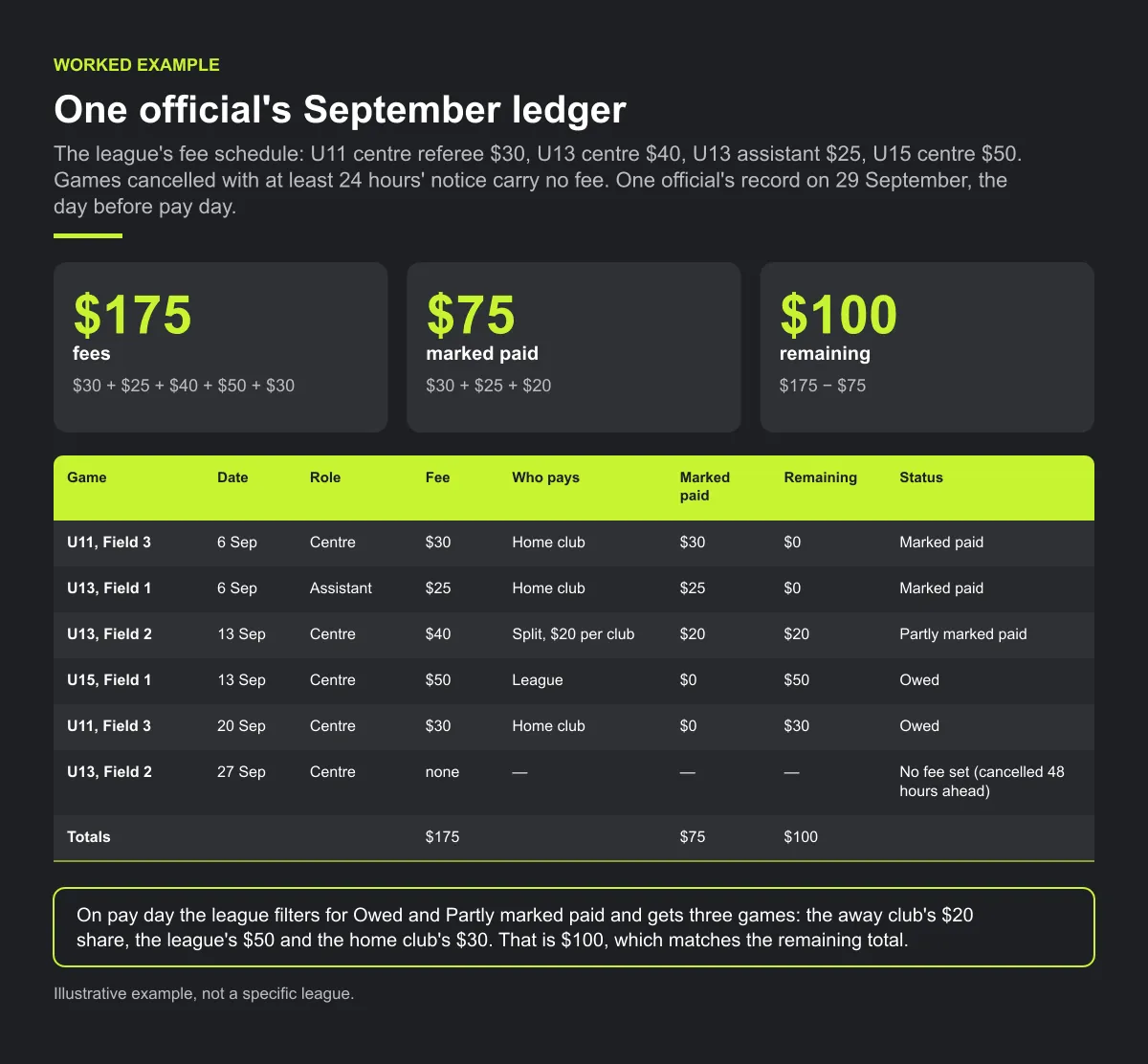
Check the arithmetic: fees $30 + $25 + $40 + $50 + $30 = $175; marked paid $30 + $25 + $20 = $75; remaining $175 − $75 = $100. On pay day the league filters for Owed and Partly marked paid and gets three games: the away club's $20 share, the league's $50 and the home club's $30. That is $100, which matches the remaining total. When each payer marks its game paid with the date and method, remaining drops to $0.
The cancelled game stays on the ledger with its reason, so when the official asks about 27 September, the answer is already written down.
Checklist: referee fee tracking
- Fee schedule published by division and role, with who pays.
- One fee record per game, created at assignment.
- Written rules for cancelled, abandoned, no-show and moved games.
- Fixed pay cycle; each payment marked with date and method.
- Monthly check: owed, paid and remaining per official.
- Officials can see their own record.
Common mistakes
- One fee for every game. Rates by division and role belong in the record, not in someone's memory.
- Marking a split game paid when one club has paid. Keep it partly paid until both shares are in.
- Deleting cancelled games. Keep the record with "no fee" and the reason.
- Letting several people mark payments. Keep money tasks with one named person and a backup.
How Play 2 Earn Sports supports this
- A fee record for each game. The league or tournament sets a default referee fee, and the hosting club or league can change it for one game.
- Marked paid, with method, date and note. The hosting club marks the fee paid, and the status follows: No fee set, Owed, Partly marked paid or Marked paid.
- The referee sees it. On their "Match fees" page, the referee sees each game, who pays, its status and what is owed and paid, with totals for owed, paid and remaining.
- Money stays with the owner. League staff can be given fees as view only, at most.
- Records only. No money moves through Play 2 Earn. The league or club pays the referee directly, for example by e-transfer.
See referee fee tracking in a demo league.
Frequently asked questions
Publish a fee schedule by age group and role, create one fee record per game when the referee is assigned, record who pays, keep a short status list (owed, partly paid, paid), pay on a fixed cycle, and let officials see their own record.
Either works if it is written down before the season. Options include the home club, the league, or a split between both clubs. What matters is that every game's record says who pays.
Decide it in your rules. One approach is no fee if the official is told before a set cutoff, and a full or partial fee if the game is abandoned after it starts.
On a fixed cycle that officials know in advance, for example every two weeks. A predictable pay day gives "have I been paid?" one answer.
No. Play 2 Earn Sports records each game's referee fee and shows the referee what is owed and what has been marked paid. The league or club pays the referee directly, for example by e-transfer. No money moves through Play 2 Earn.
Starter is free for clubs with up to 10 teams. Pro is $49.67 USD a month for 11 to 25 teams. Unlimited is $99.67 USD a month for 26 or more teams. For leagues, Starter is free for up to 10 clubs, League Pro is $97.85 USD a month for 11 to 25 clubs, and League Unlimited is $196.35 USD a month for 26 or more clubs. Every feature is on every plan, and players and parents are always included. See pricing.
Related guides
- League scheduling guides: every league scheduling guide in one place.
- Club fee reminders without the awkward conversation
- How to build a youth league schedule
- Referee scheduling software
- Sports league scheduling software
- Pricing
