

In this guide
- Why referees miss games or go to the wrong field
- Step 1 — build a referee roster
- Step 2 — set the level each game needs
- Step 3 — assign on a fixed rhythm
- Step 4 — get every referee to accept or decline
- Step 5 — make the venue impossible to misread
- Step 6 — when a game moves, tell the referee
- Worked example — one Saturday's assignments, and a decline
- How Play 2 Earn Sports supports this
- Frequently asked questions
- Related guides
An illustrative question from a league organizer (not a real quote): "Every Saturday at least one referee doesn't show, and last week one went to Field 2 at the wrong park. We send the assignments as a spreadsheet by email, and half the time a game has moved since. How do I assign referees to youth league games?"
Why referees miss games or go to the wrong field
- No confirmation. The assignment went out, but nobody knows whether the referee saw it or can make it.
- Old versions. A spreadsheet sent on Monday is wrong by Thursday.
- Ambiguous venues. "Field 2" at a park with two entrances, or a rink complex with four sheets.
- The wrong level. A brand-new referee on the oldest division's toughest game.
- Changes don't reach them. Families hear about a moved game. The referee doesn't.
Step 1 — build a referee roster
One line per referee:
- Sport or sports they officiate.
- Level or certification.
- Dates they can't work.
- How far they'll travel, and the most games they'll do in a day.
Ask referees to update their unavailable dates by a set day each week or month.
Step 2 — set the level each game needs
Write it down before you assign. Illustrative, not a rule: the youngest divisions any level, the middle divisions a mid-level referee, the oldest divisions and playoffs the most experienced. New referees start on games where an experienced official or club mentor is nearby. Put the level rule in the league rules, so a club that asks for a stronger referee for a particular game knows what the league has committed to and what it hasn't.

Step 3 — assign on a fixed rhythm
- Assign two to three weeks ahead, on the same day each week.
- Start with the hardest games: the oldest divisions, the top of the table, playoffs.
- Spread games fairly across referees, and respect travel and games-per-day limits.
- One person owns assignments, such as a referee coordinator, not each club.
Step 4 — get every referee to accept or decline
- Every assignment needs an answer: accepted or declined, by a deadline such as 72 hours.
- No answer by the deadline means a follow-up the same day.
- A declined or handed-back game is reassigned the same day, not the night before.
- Keep a short "open games" list for the coordinator: every game still waiting for a referee.

Step 5 — make the venue impossible to misread
For every venue, publish once and keep current:
- The full venue name and address, and the parking entrance.
- Numbered fields, rinks, courts or diamonds, with a simple map.
- Where referees check in, and how early to arrive.
- A game-day contact at the venue, by role.
Put the field or rink number in every assignment, not just the venue name.
Illustrative example, not a specific league.
Here is an illustrative example. A league emails assignments as a spreadsheet. One game moves on Thursday, the referee works from Monday's file, and arrives at the right park but the wrong field, twenty minutes late. A confirmed assignment with the field number, and a notice when the game moved, would have put the referee in the right place.
Step 6 — when a game moves, tell the referee
Every moved or postponed game goes to the referee as well as both teams and families. Then confirm the referee can still make the new time. If not, reassign, using the same level and availability checks as the first assignment. Put the moved game back on the open-games list until a referee has accepted it, so it can't slip through as "already assigned".
Worked example — one Saturday's assignments, and a decline
Illustrative example, not a specific league.
Six games at one park on three numbered fields. The league's level rule: U10 any level, U12 Level 2 or higher, U14 Level 3 or higher. Five referees are on the roster:
| Referee | Level | Max games that day | Saturday |
|---|---|---|---|
| R1 | 4 | 3 | Available |
| R2 | 3 | 2 | Available |
| R3 | 2 | 2 | Available |
| R4 | 1 | 2 | Available |
| R5 | 3 | 2 | Unavailable |
Capacity check: the four available referees can do 3 + 2 + 2 + 2 = 9 games, and there are 6. But only R1 and R2 can take the two U14 games, so the U14s are assigned first.
| Game | Time | Field | Division | Level needed | First assignment | After R2 declines |
|---|---|---|---|---|---|---|
| G1 | 9:00 | Field 1 | U10 | Any | R4 | R4 |
| G2 | 9:00 | Field 2 | U12 | 2+ | R3 | R3 |
| G3 | 10:30 | Field 1 | U10 | Any | R4 | R4 |
| G4 | 10:30 | Field 3 | U14 | 3+ | R1 | R1 |
| G5 | 12:00 | Field 2 | U12 | 2+ | R1 | R3 |
| G6 | 12:00 | Field 3 | U14 | 3+ | R2 | R1 |
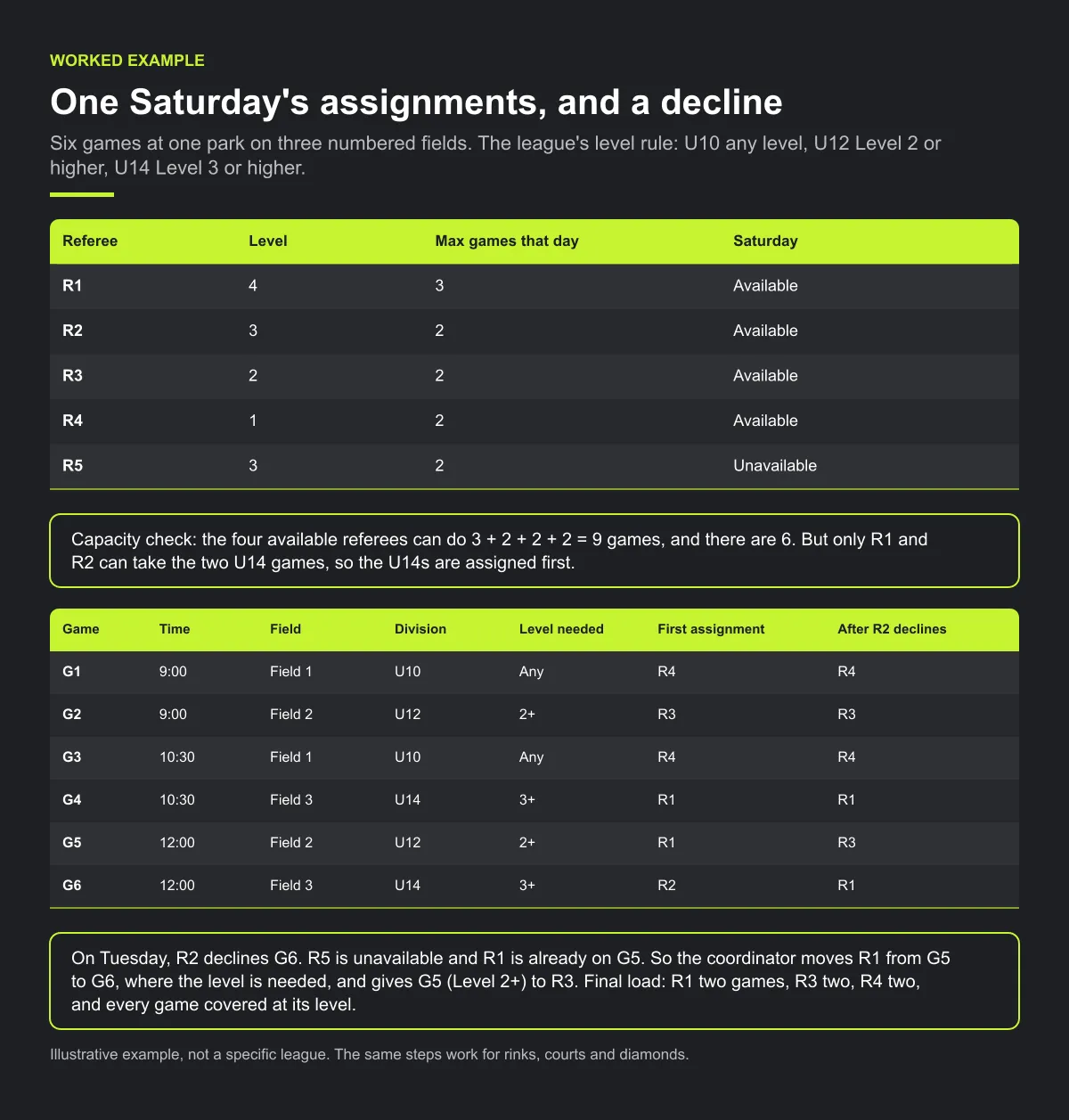
On Tuesday, R2 declines G6. Nobody else at Level 3 or higher is free at 12:00: R5 is unavailable and R1 is already on G5. So the coordinator moves R1 from G5 to G6, where the level is needed, and gives G5 (Level 2+) to R3. Final load: R1 two games, R3 two, R4 two, and every game covered at its level. Each referee's assignment names the field number, not just the park. The same steps work for rinks, courts and diamonds.
Checklist: referee assignments
- Roster current: sport, level, unavailable dates, travel and daily limits.
- Level needed written for every division.
- Assigned two to three weeks ahead, hardest games first.
- Every assignment accepted or declined by the deadline.
- Open-games list checked daily until empty.
- Field, rink, court or diamond number in every assignment.
- Moved games re-confirmed with the referee.
Common mistakes
- Assigning the easy games first. The scarce, high-level officials end up on games anyone could do.
- Treating "sent" as "confirmed". An assignment with no answer is still an open game.
- Reassigning with fewer checks than the first time. A rushed replacement can be the wrong level or already booked.
- Naming the venue but not the field. Large parks and rink complexes have several surfaces.
How Play 2 Earn Sports supports this
- The league assigns a referee to each game. League staff with referee assignments, such as a referee coordinator, pick a referee for each league game. Referees do not claim league games themselves.
- The picker checks sport, level and availability. It hides referees of the wrong sport and flags anyone below the league's required level or unavailable that day. The league sets the level needed: any level, or Level 1 to 5 or higher.
- Referees accept, decline or hand back. The referee answers each assignment, and the league is told. Each game shows its state: waiting for referee, accepted, declined or handed back. Referees see their league games in "My matches" and set the days they can't work.
- Referees on approved club requests. When the league approves a club's request, the clubs and the referee are told. Tell everyone else in the game yourself.
- What stays outside the league picker. Referees can claim tournament and club games from an Open games list, but league games are assigned by the league. Field maps and arrival instructions are something you publish.
Assign referees with sport, level and availability checked.
Frequently asked questions
Keep a referee roster with sport, level and unavailable dates, set the level each game needs, assign two to three weeks ahead on a fixed day, get every referee to accept or decline by a deadline, and publish venues with numbered fields and a map.
One approach is two to three weeks, on the same day each week, so referees know when to look and there's time to reassign declines.
Date, start time, venue name and address, the field, rink or court number, the teams, the arrival time and a game-day contact by role.
Follow up the same day the deadline passes, and reassign a declined or handed-back game the same day. Keep a list of every game still waiting for a referee.
No. The league assigns a referee to each league game, and the referee accepts, declines or hands it back. Referees can claim tournament and club games from an Open games list, which doesn't include league games.
Starter is free for clubs with up to 10 teams. Pro is $49.67 USD a month for 11 to 25 teams. Unlimited is $99.67 USD a month for 26 or more teams. For leagues, Starter is free for up to 10 clubs, League Pro is $97.85 USD a month for 11 to 25 clubs, and League Unlimited is $196.35 USD a month for 26 or more clubs. Every feature is on every plan, and players and parents are always included. See pricing.
Related guides
- League scheduling guides: every league scheduling guide in one place.
- Referee scheduling software
- Sports league scheduling software
- Rainout and field closure process
- Pricing
