

In this guide
- Delivered, read, acknowledged, acted on
- Why parents say they were never told
- Step 1 — decide which messages need an answer
- Step 2 — ask for a reply, every time
- Step 3 — follow up the silent families, personally
- Step 4 — keep a simple record
- Worked example — one message that needs an answer, start to finish
- How Play 2 Earn Sports supports this
- Frequently asked questions
- Related guides
The question club leaders ask: "We sent the message. On Saturday, half the team still went to the wrong rink and said nobody told them. How do we know who has actually read the important stuff?"
Delivered, read, acknowledged, acted on
| Level | What it tells you | What it doesn't |
|---|---|---|
| Delivered | The message reached a phone or inbox | That anyone opened it |
| Read | Someone opened it | That they understood it, or that the right adult saw it |
| Acknowledged | A person answered: "Got it" or an RSVP | That they will follow through |
| Acted on | The form is in, the player is at the right field, rink or court | Nothing. This is the goal. |
It is easy to measure delivery and miss action. A parent can open a message between games and forget it by the time they get home. Reading is not the same as knowing.
Why parents say they were never told
"Nobody told us" may point to a real gap. Possible causes:
- The wrong channel. The message went somewhere they don't check: an old group chat, a work email, a social page.
- Buried. It sat between jokes, photos and "great game!" messages.
- The other parent. It went to the adult who registered, not the one doing the driving.
- No answer was asked for. Nothing in the message asked them to respond, so nothing made it stick.
Finding a gap may reveal a change that helps other families too. See parents missing schedule changes for the channel problem.
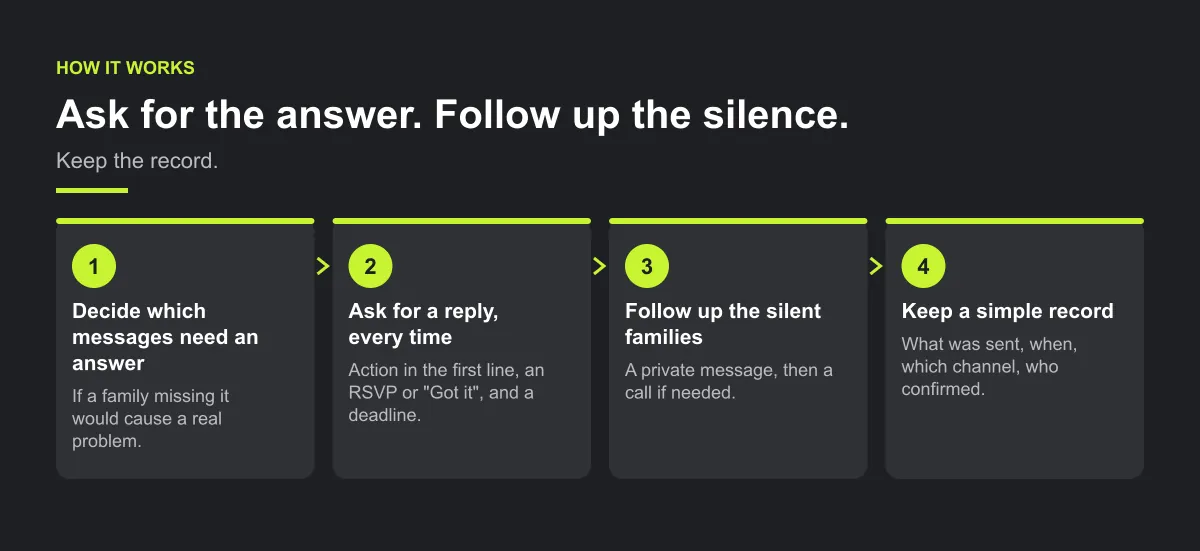
Step 1 — decide which messages need an answer
Asking for replies to everything can train families to ignore the request. Ask for an answer on:
- Schedule or location changes, especially close to game day
- Anything with a deadline: forms, uniform orders, registration
- Safety and policy updates: weather policy, code of conduct, concussion protocol
- Tournament travel and anything that costs a family money
The test: if a family missing this would cause a real problem, it needs an answer.
Step 2 — ask for a reply, every time
Put the action in the first line. Use an RSVP where you can, or ask for a two-word reply, with a deadline so silence means something.
Action needed by [day]: [one line on what changed]. Please reply "Got it" (or answer the RSVP) so we know you've seen this. Details: [time, place, what to bring]. Questions? Contact [team manager].

Step 3 — follow up the silent families, personally
At the deadline, make a short list of who has not answered. The team manager sends each family a private message, then calls if needed. Never post "still waiting on five families" in the group chat.
Ask what silence means before assuming refusal. Ask: Did this reach you? Is this the best way to contact you? Should we add the other parent?
Illustrative example, not a specific club.
Here is an example. A venue changes on Thursday night. By Friday noon, three families haven't replied. The manager messages each privately: one had notifications off, one message only reached the other parent, one just hadn't looked. All three are at the right rink on Saturday.
Step 4 — keep a simple record
For messages that matter, note what was sent, when, on which channel, who confirmed and who was followed up. A spreadsheet is fine. It isn't about winning an argument. It helps you see where to investigate and what you may need to change about the channel, contact details or wording.
Worked example — one message that needs an answer, start to finish
Illustrative example, not a real club.
A club updates its concussion return-to-play policy mid-season and needs every family on its U13 basketball team to confirm they have seen it. Here is the full sequence.
Monday, 6:00 p.m. — the request:
Action needed by Wednesday 8:00 p.m.: our concussion return-to-play policy has changed. A player who has a suspected head injury now needs a written all-clear before returning to practice or games. Please reply "Got it" so we know you've seen this. The full policy is attached and in the parent handbook. Questions? Contact [team manager] at [email].
Wednesday, 8:00 p.m. — the deadline. The team manager lists the families who have not replied.
Thursday, morning — private follow-up, one family at a time:
Hi [name], we're checking every family has seen Monday's message about the new concussion policy. Could you reply "Got it" when you have a moment? If messages from the club aren't reaching you, or should go to another parent too, let me know and we'll fix it.
Thursday, evening — a phone call to anyone still silent.
The record:
| Family | Sent | Replied | Follow-up | Outcome | Fix needed |
|---|---|---|---|---|---|
| Family A | Mon, chat + email | Mon 7:10 p.m. | None | Confirmed | None |
| Family B | Mon, chat + email | No | Thu message | Confirmed Thu | None |
| Family C | Mon, chat + email | No | Thu message, Thu call | Confirmed by phone | Notifications were off; email address updated |
| Family D | Mon, chat + email | No | Thu message | Other parent replied Thu | Second guardian added |
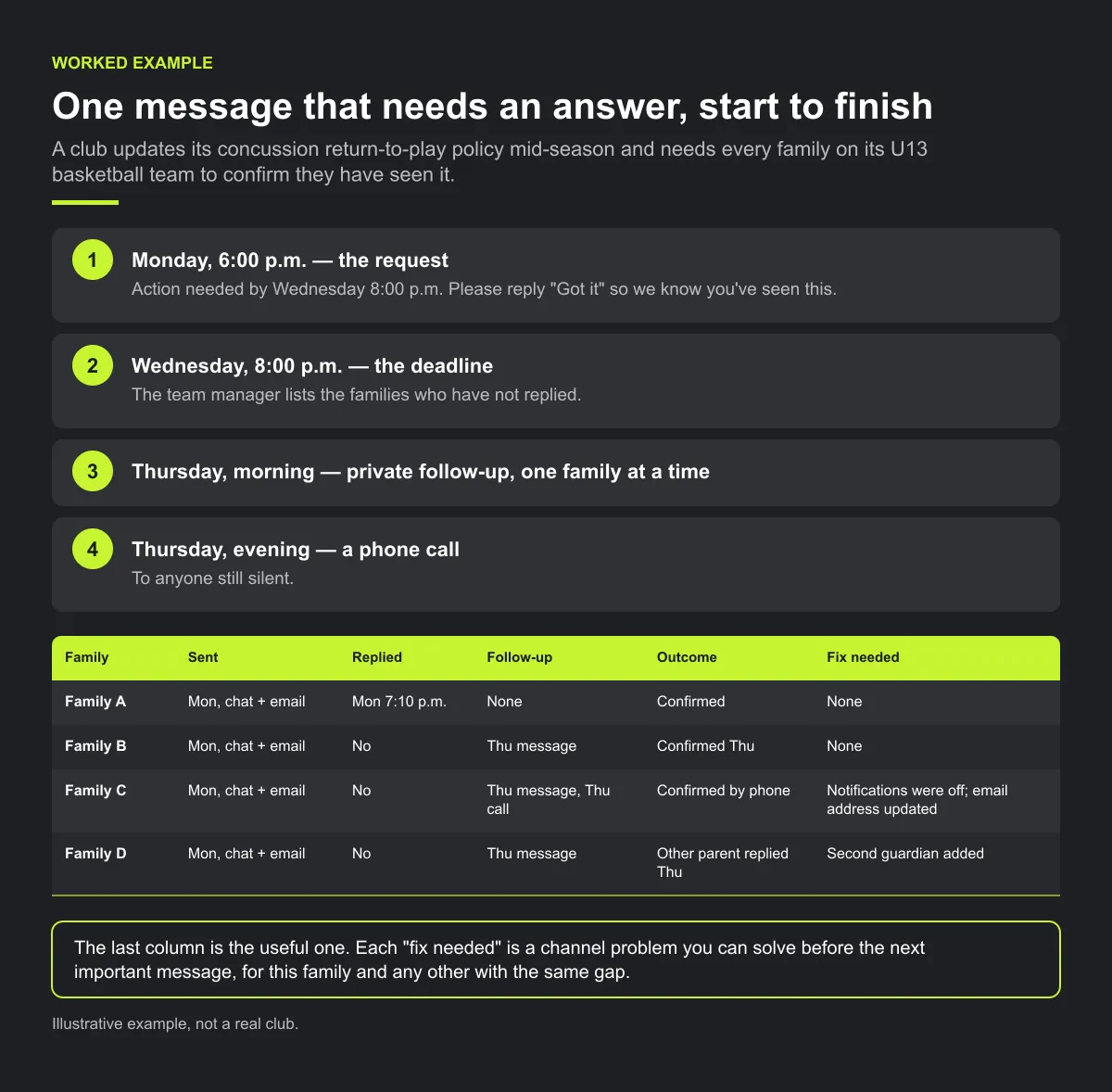
The last column is the useful one. Each "fix needed" is a channel problem you can solve before the next important message, for this family and any other with the same gap.
Checklist: for a message that needs an answer
- The action and the deadline are in the first line.
- The reply asked for is simple: an RSVP or two words.
- It went to every linked parent or guardian.
- At the deadline, someone lists the silent families.
- Each silent family gets a private message, then a call.
- The record notes who confirmed and what needed fixing.
- Contact details or channels are corrected before the next message.
Common mistakes
- Treating a "Read" tick as confirmation. A tick shows an opened message, not an understood one, and it may not show which adult saw it.
- Naming silent families in the group. It embarrasses people and can make them less likely to reply next time.
- No deadline. Without one, silence never means anything, and follow-up never starts.
- Asking for "Got it" on everything. Keep it for the messages that matter, or the request stops meaning anything.
How Play 2 Earn Sports supports this
- RSVPs with reminders. Events have RSVPs, and coaches see who has "No reply". That list is your follow-up list. An RSVP is a family's answer; it is not a read receipt and it is not attendance.
- Change notices. When a league approves a club's postponement or weather request, the affected clubs and assigned referee receive a notice. Each club should tell its own players and parents through its usual channel. A changed schedule is not proof that every family saw it.
- Club announcements, separate from team chat, so official messages are not buried in conversation.
- More than one parent or guardian can be linked to a child.
- Read ticks in team chat, as a signal. The sender sees Sent and Read ticks on their own message. "Read" appears only when all other participants in that chat have read it. There is no named list of who read it, and people reading only as a guardian don't send read receipts.
Play 2 Earn Sports does not give you a per-person record of who read a message or proof that a family saw a schedule update. For anything that matters, ask for an answer.
See RSVPs, change notices and team chat in one place.
Frequently asked questions
You can't know for certain from a "read" tick. For messages that matter, ask every family for a reply or RSVP by a deadline, follow up the ones who stay silent personally, and keep a simple record of who confirmed.
It may be because the message went to a channel they don't check, was buried among other messages, went to the other parent, or never asked them to respond. Treat it as a gap to fix, not an argument to win. See parents keep missing schedule changes.
No. A read tick shows that a message was opened, not that it was understood or acted on. Use replies and RSVPs for anything important.
Message them privately, then call. Check their contact details and ask whether another parent or guardian should be added.
No. It embarrasses families. Follow up privately.
Starter is free for clubs with up to 10 teams. Pro is $49.67 USD a month for 11 to 25 teams. Unlimited is $99.67 USD a month for 26 or more teams. Every feature is on every plan, and players and parents are always included. See pricing.
Related guides
- Parent communication guides: every parent communication guide in one place.
- Parents keep missing schedule changes
- Club communication standards
- Field closures and rainouts
- What parents should see about their child's games
- Sports club management software
- Pricing
