

In this guide
The buyer's question: Which scheduling software fits our volunteer-run youth league, and how do we compare options fairly?
Start with your league, not the software
Before you look at any tool, write down five things:
- Number of teams and divisions, this season and in three years.
- Venues: how many fields, rinks or courts, and whether you share them.
- Officials: who assigns referees, and how they find out about changes.
- Money: how you collect fees today, and whether you want that in the same tool.
- Who will run it: one volunteer, a board, or paid staff.
Score every tool against this list, not against its feature page.

The 10-point buyer's checklist
| # | Check | What to look for |
|---|---|---|
| 1 | Scheduling engine depth | Can it build a full season (round robin, divisions, home/away)? Which formats: round robin, pools, single or double elimination? |
| 2 | Venue conflicts | Does it flag field, rink or court double-bookings before you publish? |
| 3 | Referees and officials | Can you assign officials, and are they told when a game moves? |
| 4 | Standings | Do standings update from results? Who enters and confirms them? |
| 5 | Registration | Team registration for the league? Player registration for clubs? Deadlines? |
| 6 | Payments | Does it collect money, and what does each transaction cost? Or will you keep your current method? |
| 7 | Parent communication | When a game moves, who is told, how, and how fast? |
| 8 | Import | Can you bring this season's schedule and rosters in, or will someone re-type them? |
| 9 | Price model | Per team, per player, per transaction, quote-based or free? What happens to the price as you grow? |
| 10 | Support | Who answers when the schedule breaks on a Friday night? |
Questions to ask in every demo
- "Show me a full season being built for our divisions and venues, not a sample."
- "Move one game. Show me exactly who is told, and how."
- "What happens to games I've rescheduled if I re-run the scheduler?"
- "Show me how a referee finds out about a change."
- "What will this cost at our size next season, including transaction fees?"
- "If we leave, how do we get our schedule and rosters out?"

Red flags
- "It handles any constraint instantly." Ask to see your hardest week.
- Re-running the scheduler wipes your manual changes.
- No answer on officials: the referee hears about a change from a parent.
- A price you can only learn after a long sales process, with no example for a league your size.
- Transaction fees you can't estimate before you sign.
- Every club must switch apps on day one. (See running a league when every club uses a different app.)
Worked example — scoring two tools with weights
Illustrative example, not a specific league or real products.
A 22-team league shares fields and rinks, has a referee coordinator and already collects fees by e-transfer. Before any demo it weights each check 1 (nice to have) to 3 (must have). After each demo it scores each check 0 (not shown), 1 (partly) or 2 (shown working with its own data). Weighted score = weight × score.
| # | Check | Weight | Tool X score | Tool X weighted | Tool Y score | Tool Y weighted |
|---|---|---|---|---|---|---|
| 1 | Scheduling engine | 3 | 2 | 6 | 2 | 6 |
| 2 | Venue conflicts | 3 | 2 | 6 | 2 | 6 |
| 3 | Referees | 2 | 1 | 2 | 2 | 4 |
| 4 | Standings | 2 | 2 | 4 | 1 | 2 |
| 5 | Registration | 1 | 2 | 2 | 1 | 1 |
| 6 | Payments | 1 | 2 | 2 | 0 | 0 |
| 7 | Parent communication | 3 | 1 | 3 | 2 | 6 |
| 8 | Import | 2 | 1 | 2 | 2 | 4 |
| 9 | Price model | 2 | 1 | 2 | 2 | 4 |
| 10 | Support | 1 | 2 | 2 | 1 | 1 |
| Total (max 40) | 20 | 16 | 31 | 15 | 34 |
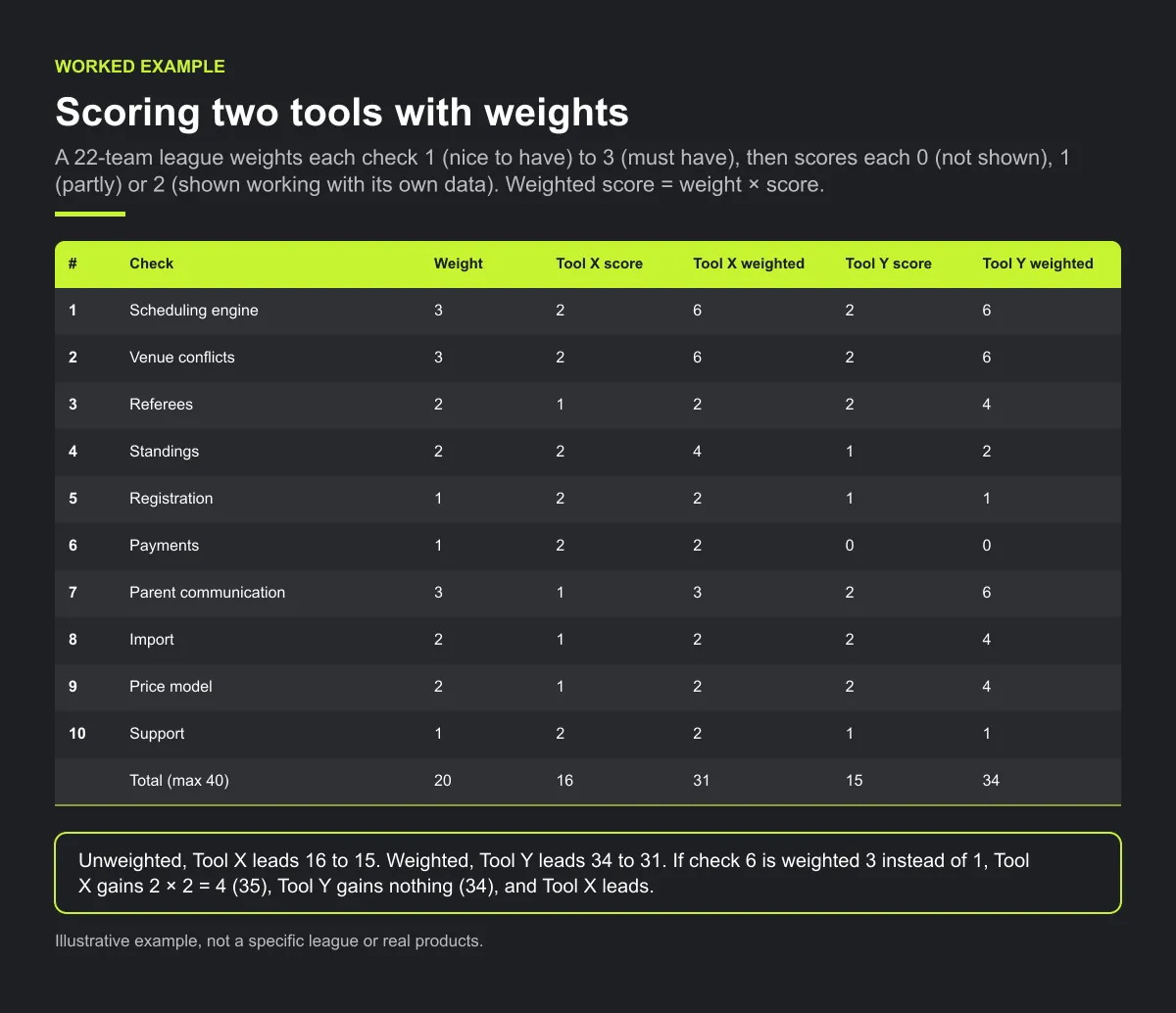
Unweighted, Tool X leads 16 to 15. Weighted, Tool Y leads 34 to 31, because it scores higher on this league's must-haves. A league that wants payments in the tool might weight check 6 at 3 instead of 1: Tool X gains 2 × 2 = 4 (35), Tool Y gains nothing (34), and Tool X leads. Same demos, different answer, so set the weights first.
Checklist: a fair software evaluation
- League needs written down: teams, venues, officials, money, who runs it.
- Weights (1 to 3) agreed by the board before any demo.
- Every demo uses your own divisions, venues and hardest week.
- Prices checked at next season's size, including any transaction fees.
- Export and exit tested: how your schedule and rosters come out.
Common mistakes
- Scoring the feature page, not the demo. A feature listed is not a feature shown working with your data.
- Setting weights after the demos. It is easy to weight towards the tool you already liked.
- Comparing this season's price only. Check the price at the size you expect in two or three years.
A dated comparison of six options
Checked on 2026-10-13 against each company's own public pages. Features and prices change; confirm on their sites before deciding. "Check their site" means we couldn't verify it on their public pages that day, not that the tool lacks it.
| Schedule building (their words) | Officials | Standings | Registration and payments | Price model | Sources | |
|---|---|---|---|---|---|---|
| TeamSnap | "Easy roster-building and schedules" | Check their site | Check their site | Sign-ups "with integrated payments and automated reminders" | Clubs and leagues: "customized pricing"; single teams "$0 to start" | teamsnap.com/pricing; teamsnap.com/leagues-and-clubs |
| SportsEngine (HQ) | "Auto scheduling"; "Seasons & schedules" | Check their site | Check their site | "Online registration"; "Easy payments" | "Get Pricing" (no prices listed) | sportsengine.com/hq/ |
| TeamLinkt | "Generate season schedules … and sync to calendars"; "Conflict-free schedules" | "Officials & scorekeeper assigning" in a paid add-on | "Track scores and standings in real time" | Forms with payments and instalment plans | Core "$0 forever"; add-ons $425/year each or $795/year bundle; per-transaction rate on payments | teamlinkt.com/pricing; teamlinkt.com |
| LeagueApps | "Auto-schedule a full season in minutes"; facility bookings | Check their site | Shares "scores, and standings" | "Power your registration, payments …" | No subscription; "a small % of your online transactions"; quote-based | leagueapps.com; leagueapps.com/pricing/; leagueapps.com/scheduling/ |
| Spond | Single, repeating and season-planner events | Check their site | Check their site | Payment requests; per-transaction fee (US: 3.29% + $1.00 per their help centre) | "A free app"; fees on payments | spond.com/en-us/; help.spond.com (Spond Club transaction fee article) |
| GameChanger | "Schedule games and practices for teams across your organization" | Check their site | "See how every team in your league and tournament is playing and how they rank" | Check their site | Free for coaches and staff; family/fan plans "starting as low as $3.33/month" | gc.com; gc.com/organizations |
| Play 2 Earn Sports | Season builder with round robin, divisions, home/away balance, team availability, venue-conflict checks; round robin, pools, single elimination | Referee assignment; the clubs and the referee are told when the league approves a club's request | Update from confirmed results | League team-registration deadlines; dues recorded with reminders; no payment collection | Starter is free for clubs with up to 10 teams. See the pricing answer below | This site (Codex code check of live product, 2026-10-13) |
Where others are stronger
Be clear-eyed about this:
- Taking payments. TeamSnap, SportsEngine, TeamLinkt, LeagueApps and Spond all describe collecting money in their own tools. Play 2 Earn Sports doesn't collect payments; it records dues and sends reminders, and families pay by your existing methods.
- Game-day stats and streaming. GameChanger is built around scoring, stats and live streaming for its sports.
- Officials in an add-on. TeamLinkt lists officials and scorekeeper assigning in a paid add-on.
- Formats. If you need double elimination or Swiss, Play 2 Earn Sports doesn't offer them.
- App stores. Our app installs from the website on iPhone and Android; it isn't in the App Store or Google Play.
How Play 2 Earn Sports supports this
- League auto-scheduling builds a season with round robin, divisions, home/away balance, team availability and venue-conflict checks that flag field and team double-bookings. A published or locked schedule is not regenerated over.
- Formats: round robin, pools and group stages, and single elimination.
- Change notices: When the league approves a club's request, the clubs and the referee are told. Tell everyone else in the game yourself.
- Standings update from confirmed results.
- Import a schedule from a calendar link (one-way) and rosters by CSV. Not a full migration.
- Teams roll up to clubs, and leagues set team-registration deadlines.
- 18 sports, on the web and an app that installs from the website.
Score Play 2 Earn Sports against your own league in a 30-minute demo.
Frequently asked questions
The one that fits your league. Score each option on scheduling depth, venue conflicts, officials, standings, registration, payments, communication, import, price model and support, then test it with your own divisions in a demo.
It depends on what you schedule. Leagues need season building and venue conflict checks; single teams need simple calendars and RSVPs; tournaments need pools and brackets. Match the tool to the job.
Sometimes. Check what's limited on the free tier and how the price changes as you grow, including any per-transaction fees.
Only if that's what your league wants. Some tools in the comparison above describe per-transaction fees on payments. Others, including Play 2 Earn Sports, leave fee collection to your existing methods.
If you can avoid it, don't. Import this season's schedule if you can, run the new tool alongside, and switch fully at the start of a season.
Starter is free for clubs with up to 10 teams. Pro is $49.67 USD a month for 11 to 25 teams. Unlimited is $99.67 USD a month for 26 or more teams. For leagues, Starter is free for up to 10 clubs, League Pro is $97.85 USD a month for 11 to 25 clubs, and League Unlimited is $196.35 USD a month for 26 or more clubs. Every feature is on every plan, and players and parents are always included. See pricing.
Related guides
- League scheduling guides: every league scheduling guide in one place.
- All alternatives
- TeamSnap alternative · SportsEngine alternative · TeamLinkt alternative
- LeagueApps alternative · Spond alternative · GameChanger alternative
- League scheduling software
- Referee scheduling software · Tournament scheduling software
- Running a league when every club uses a different app
- Pricing
Sources
- TeamSnap pricing (checked )
- TeamSnap for leagues and clubs (checked )
- SportsEngine HQ (checked )
- TeamLinkt pricing (checked )
- TeamLinkt (checked )
- LeagueApps (checked )
- LeagueApps pricing (checked )
- LeagueApps scheduling (checked )
- Spond (checked )
- Spond Club transaction fee (help centre) (checked )
- GameChanger (checked )
- GameChanger for organizations (checked )
